|
 |
|
|
| |
| You are here: Home » Products » PolyTrans-for-Maya |
|



Support: 905-672-9328 Copyright © 2024 Okino Toronto, Ontario, Canada.  |

PolyTrans-for-Maya Product Description
PolyTrans-for-Maya Product Description



This information applies equally to Okino's mirror twin "PolyTrans-for-3ds-Max" product.
Overview
PolyTrans-for-Maya is a premiere plug-in system for Maya (Windows) that allows Maya to freely exchange complete 3D scene data with virtually any other 3D software package, such as 3ds Max (via PolyTrans-for-3dsMax and Okino .bdf format), Autodesk Inventor, Biovision BVH and Acclaim motion capture, CATIA v5, CINEMA 4D, Collada, DGN (MicroStation), DirectX, DXF/DWG, DWF-3D (AutoCAD, Navisworks, Revit and Inventor), Electric Image FACT, ESRI, FBX (Unity, Unreal Engine, MODO, etc), IGES (BREP solids), JT Open, LightWave, OpenFlight, PARASOLID (such as for Siemens UG NX), PDB (protein database), PLY, Pro/Engineer & Creo (using the real PTC core software), Rhino-3D, SketchUp, SGI Inventor2, Solid Edge, SolidWorks, STEP (BREP solids), STL, U3D, USGS DEM & Gtopo-30, Viewpoint VET, VRML2, Wavefront OBJ, XAML-3D, X3D, XGL and many others. Some conversion pipelines are import or export only.
PolyTrans-for-Maya has become one of Okino's most popular, specialized plug-in converter systems since it adds a lot of new functionality to the Maya software package itself. It also forms a natural and well refined pipeline between Maya and 3ds Max via the mirror twin 'PolyTrans-for-Maya' and 'PolyTrans-for-3ds-Max' native plug-in modules.
PolyTrans-for-Maya breaks down all previous data translation barriers and truly makes Maya a universally open software package. In the tradition of all Okino 3D data translators, resulting translated files are 'Render Ready' meaning that they can be loaded and rendered in the destination program (3ds Max, Maya, CINEMA-4D, LightWave, etc.) with little or no changes necessary. The translation process accommodates polygonal meshes, trimmed NURBS, hierarchy, vertex normals/colors/texture-coordinates, material and texture mapping parameters, lights, cameras, object/camera/light animation conversion (file format specific) and automatic 2D bitmap conversion (when necessary).
![[Maya Screen Snapshot]](/images/maya_cdrs car - 300.jpg)
PolyTrans-for-Maya provides scene, trimmed NURBS (format specific) and animation conversion (format specific), in dozens of state-of-the-art file formats. Our programming team typically spends several years to decades (the latter on 3ds Max, CINEMA-4D, Maya, LightWave, SolidEdge/SolidWorks/Inventor, etc) writing each translator, and we strive to overcome the "hard" problems often encountered in real world situations. In addition, our hands-on technical support is well known; you always talk with our programmers directly.
![[Maya Screen Snapshot]](/images/maya_solidedge_assembly_1400.jpg )
![[Maya Screen Snapshot]](/images/maya_cdrs car - 1100.jpg)
 Features & Benefits of PolyTrans-for-Maya and PolyTrans-for-3dsMax Features & Benefits of PolyTrans-for-Maya and PolyTrans-for-3dsMax |
There are hundreds of ways that PolyTrans-for-Maya and is mirror twin PolyTrans-for-3dsMax can be used to optimize the usage of Maya/3dsMax in a production pipeline where several different 3D packages are used, or simply in a one-man shop where Maya/3dsMax data has to be converted to/from another 3D package.
The most robust, efficient and highest quality 3D production-proven converters for 3ds Max and Maya. Tight integration into 3ds Max's and Maya's core scene graph allows all conversions to be performed from within the user interface of 3ds Max or Maya. Stand-alone version for all other conversion tasks. The mirror twin PolyTrans-for-3ds-Max and PolyTrans-for-Maya plug-in systems form the most technically accurate and robust bi-directional conversion system between 3ds Max and Maya. Over the last 3 decades Okino has pioneered the entire concept of bringing complex CAD assemblies into 3ds Max, Maya and its predecessors. These are very refined and efficient CAD pipelines. A typical complex CAD conversion process only takes a few minutes or less, including full scene optimizations. There is no concept of spending days or weeks 'trying' or 'struggling' to get CAD data into these programs, a myth wrongly and purposely propagated by others.
Very strong, proven and robust CAD file support. Okino has always been the most cost effective provider of solids-based CAD formats including: ACIS, Autodesk Inventor, CATIA v5, DGN (MicroStation), DXF/DWG, DWF-3D (AutoCAD, Navisworks, Revit and Inventor), IGES, JT Open, PARASOLID (such as for Siemens UG NX), native Pro/Engineer & Creo (which uses an embedded copy of PTC software for perfect translations), Solid Edge, Rhino-3D, SolidWorks, STEP, STL, U3D and VRML+X3D. The hidden magic in the conversion process is Okino's unique and proprietary CAD optimization processor, integrated into each of our CAD importers. This processor is by far the most complex aspect of our entire 3D CAD conversion software pipeline. Turn it on and it'll wrangle large and unwieldy CAD assemblies into refined datasets for efficient animation, rendering or interactive viewing. Most importantly, Okino does not use reverse engineered CAD modules as is done by others, but rather licenses, utilizes and/or accesses the industry standard CAD geometry engines from Autodesk (Inventor), Dassault Systemes (CATIA), PTC (ProE/Creo), Solid Edge, SolidWorks, Siemens (JT Open toolkit) and others. Import parts, assemblies, hierarchy and materials directly from a running copy or native file of Autodesk Inventor, Solid Edge or SOLIDWORKS. Unique! As one of the most important yet under-appreciated and un-recognized aspects of PolyTrans-for-Maya is its ability to handle the conversion, optimization and import of super ultra-massive models that no other software can remotely handle. Mind blowing examples of such massive conversions can be viewed online here (BP Clair Ridge oil & gas platform installations), here (BP Clair Ridge oil & gas platform construction) and here (CB&I oil refinery).Bullet-proof and robust import of DXF and DWG files. The Okino DXF/DWG reader reads in and converts literally any DXF or DWG file (including embedded ACIS solids) then optimizes it into a render-ready model. Huge files can be processed quickly. Memory usage is low for large scenes. However, as we explain to our new users, the much more logical and efficient method to source from AutoCAD, Inventor, Navisworks and Revit is via the Okino DWF conversion system. Okino pioneered the process and methods of animation cross conversions! 3ds Max, Maya, CINEMA-4D, COLLADA, DirectX, FBX, LightWave, VRML2/X3D, U3D, XAML and more. Very robust and well refined. Proper conversion of skeletons and bones between Maya and 3ds Max, CINEMA-4D, LightWave, Collada, FBX, U3D and DirectX. Going from Maya to 3ds Max is particularly fraught with problems but the automatic bone re-orientation algorithm resolves such problems automatically. A core Okino competency in the DCC world. Resulting translated files are 'Render Ready' meaning that they can be loaded and rendered in the destination program with little or no changes necessary. The translation process accommodates polygonal meshes, trimmed NURBS in and out (Maya), skinning/bones/joints, hierarchy, vertex normals/colors/texture-coordinates, material and texture mapping parameters, lights, cameras, frame-accurate camera locks-ups between 3ds Max and Maya, animation conversion and automatic 2D bitmap conversion. Strong ties to the visual simulation (VisSim) community with proven OpenFlight, VRML 1.0, VRML 2.0 and X3D import/export support. Controllable via a MEL-script interface (Maya) or MaxScript (for 3ds Max) for both importing and exporting of files. Dozens and dozens of options are provided via multi-pane dialog boxes inside PolyTrans-for-Maya and PolyTrans-for-3ds-Max to finely control the data conversion process. Automatic conversion of foreign 2d bitmap image file formats to/from those recognized by Maya and 3ds Max. Native Alias PIX and IFF (not Amiga IFF) 2d bitmap read/write support was also developed and added to the core PolyTrans software. Access to robust polygon processing tools which can take impossible-to-render datasets and turn them into renderable models. Functions include auto-welding, auto-unification of normals, reorientation of normals, removal of double sided polygons and more. A complex polygon reduction system is also available in the stand-alone PolyTrans. We actively support 12 legacy and all current versions of Maya and 3ds Max. This would allow, for example, a company who owns a very old copy of Maya to migrate all of their 3D assets and scenes over to the newest version of 3ds Max. Okino provides excellent, hands-on and personal tech support, for free, with each software package. We know 3D graphics and data translation inside-out!

| Customer Usage Comments |
"Intel Labs was faced with the difficult task (for a pending TV commercial) of getting a very complex Softimage scene into Maya quickly and accurately for rendering, including morphing, running robotic characters, textured and animated toys, and camera tracking. Okino worked with us to show how their PolyTrans-for-Maya software could provide the lengthy conversion as an automatic 'one button press' process, resulting in a fully animated and textured Maya scene."
-Inga Vailionis, Tech Program Manager, Intel Labs
"We have been using PolyTrans-for-3ds-Max for 12 years now. Two days before Christmas a large engineering company contracted us to animate an absolutely gargantuan oil refinery modeled in AutoCAD, in all its fine detail. We could not open it, far less convert it and do animation without the computer crashing. We contacted Okino's CTO, Robert Lansdale, who analyzed and worked on it for 2 days, returning it to us on Christmas eve as a fully optimized 3ds Max scene that we could manipulate in real time, and instructions on how to repeat the process ourselves! And at what cost? None, other than to upgrade to the newest software release. Needless to say Okino now has a customer for life. While their software is great, their customer service is unbelievable!"
Refer to here for some imagery of the oil refinery visualization.
-Vic Cherubini, President, EPIC Software Group
"In my more than 10 years in the 3D visualization business I have come to depend on Okino for their technical excellence and outstanding customer service. When they say they 'set the standard for conversion between visualization packages' it is not an idle boast. If you are not using their products today then you are doing things the hard way!"
-Bill Judge, Technical Animation Director, Applied Research Associates Inc.
" I am the writer, director and visual effects supervisor for my latest CG film called 'Bohemibot'. PolyTrans-for-Maya has been a huge help on this latest film. There were 450 fx shots handled by 80 artists. We could not have implemented such a complex multi-animation-package workflow so easily and robustly without Okino's fantastic software. I enjoy recommending it to my colleagues. Thanks for doing such a great job developing it."
-Brendan Bellomo, VFX director
"As a technical 3D illustrator and animator I often work with different applications and found out that Okino's PolyTrans-for-Maya made it easy to exchange data between them. I often have to integrate files together in Maya from such programs as One Space Designer, AutoCAD, SolidWorks and Rhino. Okino's PolyTrans-for-Maya + CAD converters were the solution for effortless translation of all this data into Maya. Spending less time for converting the data meant that I could pay more attention to the final image."
-Pieter Suur, CEO, Suur Graphics
| Pricing, Availability and Packaging |
"PolyTrans-for-Maya" for Windows is available by purchasing either of Okino's base software products, PolyTrans ($395, PT-WIN) or NuGraf ($495, NRS-WIN), and the "DCC/Pack" add-on option ($245), or any other combination of add-on converter packs which includes the "DCC/Pack" option. The base package plus the DCC/Pack license forms the special "PolyTrans-for-Maya" product.
By purchasing this combination of licenses you will gain this functionality:
If you purchase the base NuGraf package ($495, NRS-WIN), you will also have a great package for rendering, data manipulation, texture mapping and material editing. In order to convert animation data perfectly between all the major animation systems Okino has had to develop a complex animation "import, playback and conversion" core engine; this engine contains the animation functionality of Maya, 3ds Max, Cinema-4D, LightWave, DirectX, U3D, Collada, FBX, VRML 2, X3D, etc. The benefit of this long development is that NuGraf can import, play back, edit and view all of these aforementioned animation file formats, or it can create complete animations (compliant with the mathematics and techniques of these named file formats) from scratch within its Microsoft Windows user interface: this ability to import/export between all these incompatible animation file formats, or to modify/edit/create compatible animation sequences, is a completely unique feature of the NuGraf software in the world of 3D graphics. NuGraf is our main software package developed at Okino, whereas the stand-alone "PolyTrans" is only a derivative (same source code, same executable, just simpler functionality); the difference in price is $100. If you purchase the base PolyTrans package ($395, PT-WIN), you will have a stand-alone Microsoft Windows program which can read and write all of the Okino supported 3D file formats, except 3ds Max (.max) and Maya (.ma, .mb) which require the special native plug-in versions of PolyTrans to be used in their respective programs. This program can also view the imported models in fully shaded OpenGL mode, playback imported animation, perform polygon processing, edit light and cameras, and produce scanline renderings . The "DCC/Pack" license will provide native PolyTrans import/export functionality within the Maya user interface (via the Maya plug-in architecture). This is provided regardless of whether you purchase the base PolyTrans or NuGraf package. Native PolyTrans import/export functionality within the 3ds Max user interface. You can also opt for the "CAD/Pack" and "Granite/Pack" series of optional add-on converter modules which add dozens of major 3D CAD file formats to the PolyTrans-for-Maya plug-in system.
| Platforms and Availability |
PolyTrans-for-Maya is available for the Windows version of Maya. PolyTrans-for-Maya is purchased as part of the "DCC/Pack" optional add-on license, or any other add-on converter bundles which includes the "DCC/Pack" license.
| Further Information |
PolyTrans converts all important aspects of a 3D scene; this includes all geometry (meshed polygons with recursive holes, trimmed NURBS and quadrics), object hierarchy, pivot points, smoothing data (vertex normals), (u,v) texture coordinates, bump mapping information (U/V tangent vectors), lights, cameras and all texture projection methods. In addition, PolyTrans accurately matches the color, shading and texture mapping parameters between the imported and exported file formats resulting in models that will render faithfully inside Maya or in a desired target rendering program.
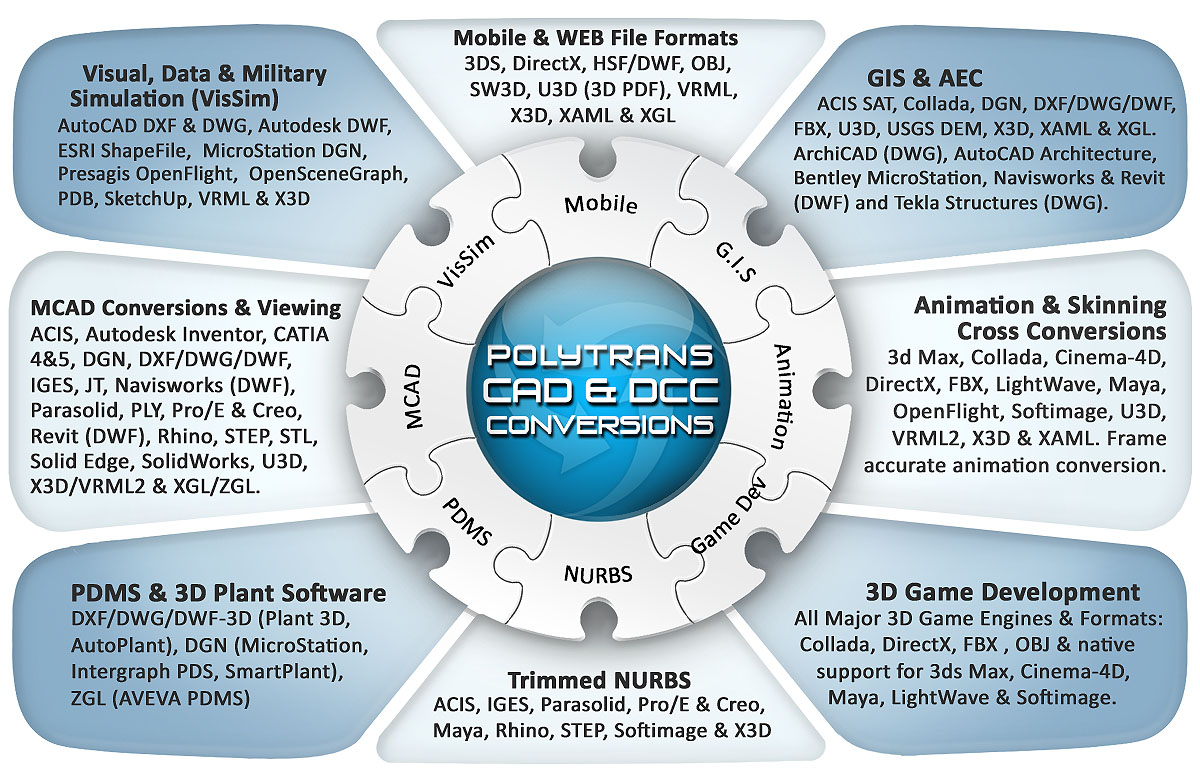
Click for larger image.PolyTrans solves professional data translation problems such as complete scene conversions to/from Maya; bidirectional scene and animation translation to 3ds Max/CINEMA-4D/LightWave/etc; complex CAD transfers; output to OpenFlight for tagging; fast DXF/DWF/DWF imports; and many more applications.
Click for larger image.
Note: some conversion paths shown in this image are uni-directional only.Okino software is used world wide by ten's of thousands of professionals, covering such varied groups as engineering, manufacturing, government, defense related, production studios, digital effects houses, animation studios, 3D content developers and most major 3D game development companies. An interesting list of notable users can be viewed online at http://www.okino.com/conv/users.htm.

| Animation Conversion Through Accurate Keyframe Resampling & Reduction |
Through years of research, development and refinement, PolyTrans has come to include the industry-leading major feature of animation conversion. Simply put, animation conversion is a hard problem! To convert between the different mathematics used by each major 3D animation package, and their different methods of internally representing 3D animated objects, Okino Computer Graphics has developed a unique "animation conversion engine". This engine allows raw animation data to be imported from the most popular 3D animation programs, accurately played back in real-time, resampled to alternate forms of animation mathematical representation and exported to other 3D animation file formats. Note that PolyTrans converts function curve based animation; it does not convert procedural or Inverse Kinematics (IK) animation data.
As shown in the right diagram, the internal "engine" stores the raw imported animation data as a series of hierarchical "channels" (such as X/Y/Z translation), each of which has a "controller" which simulates the most popular animation interpolation methods (Bezier, TCB, etc.), and to each controller a series of keyframes representing the animation curve over time. This ensures accurate retention of the imported animation data.
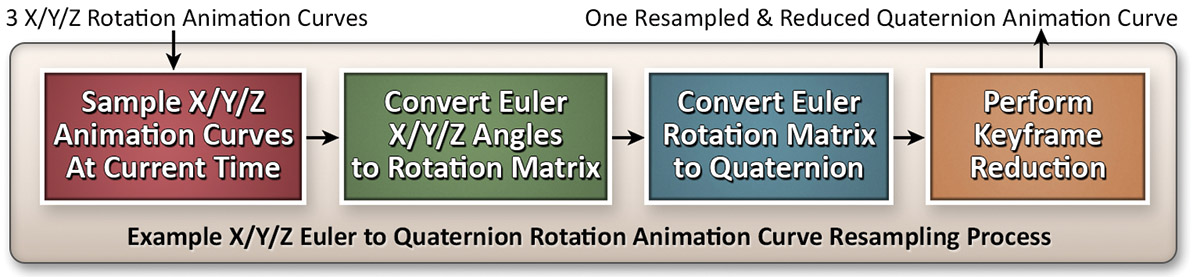
A vital aspect of accurate animation conversion is the "keyframe resampling & reduction" algorithm of PolyTrans; as shown below, this algorithm allows incompatible animation methods to be converted with tolerance-based accuracy. The example below shows how X/Y/Z Euler rotations (from LightWave or Maya) are converted into the mathematically different Quaternion rotation method (used by DirectX and 3ds Max, for example).
Click for larger image.