

 |
 |
|
|
| |
| You are here: Home » Import CAD Formats » Rhino |
|



Support: 905-672-9328 Copyright © 2024 Okino Toronto, Ontario, Canada.  |
 |
|
 Importing 3DM Rhino and OpenNURBS Files Importing 3DM Rhino and OpenNURBS Files |
This import converter reads in geometric and scene data from the OpenNURBS .3dm file format. This is the main file format used by the Rhino NURBS modeling package by Robert McNeel and Associates and is also an open standard for the transfer of NURBS based surface and curve data.
Please also refer to the corresponding Okino Rhino/OpenNURBS export converter.
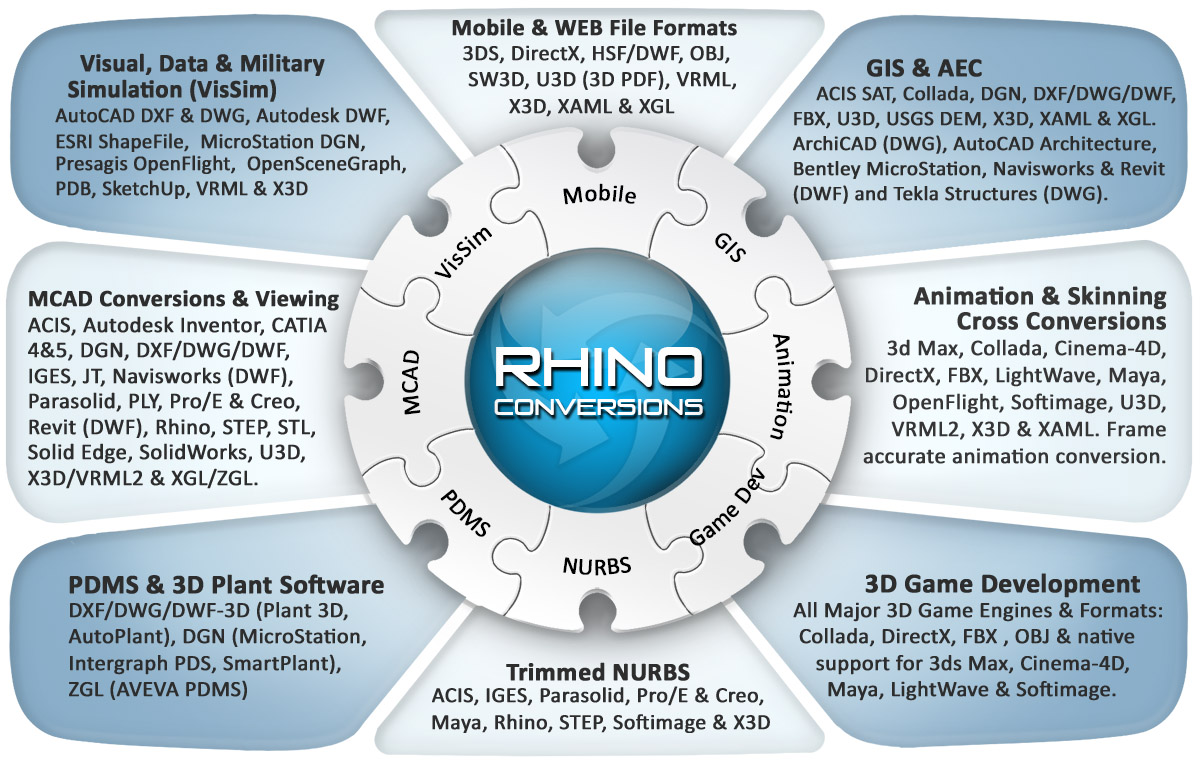
Click for larger image.
Note: some conversion paths shown in this image are uni-directional only.
| Supported Data of the Rhino and OpenNURBS 3D File Import Converter |
The following data is imported from the Rhino/OpenNURBS .3dm file format:
- Meshes with vertex normals, vertex uv texture coordinates and vertex colors are imported.
- BREPs are imported as multiple distinct NURBS surfaces (with optional trim curves) parented to one new grouping node/folder. Alternatively the Render Meshes will be used, as created in Rhino and assigned as children entities of the Rhino 'BREP' object. The 'render meshes' are required if you wish to import texture mapped BREP objects from Rhino.
- Independent NURBS curves, collection of curves (multi-segment curves) and composite curves are imported in a 1:1 manner.
- Rhino supports complex, recursive instancing of geometry items, or instancing or any number of other grouped items (referred to as 'block definitions' within the Rhino software). Okino software has equivalent functionality and hence an exact replica is reproduced of Rhino block usage and recursive instancing.
- Materials are created and assigned per layer or per object. Ambient, diffuse and specular colors are the basic entities imported from a Rhino material. A user option is provided to allow with the layer's Rhino material or RGB color to be used for a geometry item.
- The texture map associated with a material definition is imported as a texture reference.
- Ambient, spot and point light source are supported as well as their light color and intensity.
- Each recursive Rhino layer is converted into equivalent parented Okino grouping folders, and all related geometry is attached to one of these grouping folders.
- Point clouds are imported as Okino 3d point sets.
- Rhino 'Text annotations' (2d vector text) are imported and converted to Okino 3D procedural text objects.
- Points and point clouds are ignored.
| Runtime Usage Notes of the Rhino and OpenNURBS 3D File Import Converter |
- Prior to importing the .3dm file, go into Rhino and 'Render' the scene from various viewpoint
orientations to have 'Render Meshes' created for each NURBS surface. You must press
the Render button or menu item inside of Rhino, and not just put the viewports into Shaded
mode to get the render meshes. Save to .3dm and then import. Render meshes are the preferred geometry
type to import BREP solids objects. They are also required if you wish to import texture mapped
BREP solids objects.
- An alternative method to import from Rhino is via IGES and Okino's BREP solids-based
IGES importer. Use the 'ProE/Creo Windows Solids - 184 solids' IGES export format from Rhino.
- To obtain the most optimized imported scene, enable the 'Compress & optimize number of objects' checkbox. This will, however, cause all NURBS surfaces to become tessellated.
| Main Options Panel of the Rhino and OpenNURBS 3D File Import Converter |
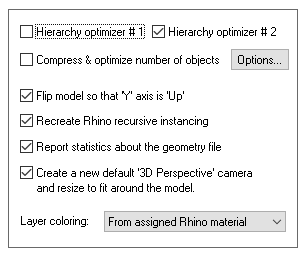
Hierarchy Optimizer # 1, Hierarchy Optimizer # 2
These options provide methods to remove redundant grouping nodes from the imported .3dm file. Optimzier # 1 removes runs of empty folders, as well as folders with no children. Optimizer # 2 is simpler, deleting empty folders which only have 1 geometry object in them. The second optimizer is useful if you batch import a number of .3dm files and find that there are a number of yellow folders (one per imported file) with one a single object in each folder.These options can also be enabled via the "Optimize hierarchy after completion" checkbox found on the options dialog box of the "Compress & optimize number of objects" option (see below).
Compress & optimize number of objects
This checkbox enables one of the most important and critical scene processing functions in all of Okino software. It is an integral and core part of any Okino CAD importer, and it has been added to the Rhino importer for added benefits.The primary purpose of this function is to walk the imported geometry hierarchy and compress together all objects that are parented under a single folder into a one new object. For example, if you import a Rhino file and find that 200 objects are grouped under one folder, then enabling this option will cause all such occurrences to collapse the children geometry of each grouping folder into one object.
The documentation for this option can be viewed by pressing the "Options" button and then the "Help" button on the optimizer's dialog box.
Flip Model so that 'Y' axis is 'Up'
By default Rhino uses a Z-up coordinate system whereas Okino software and some other 3D packages prefer a Y-up coordinate system. If this option is enabled then the imported model is reoriented so that the Z-Up coordinate system become Y-Up.Recreate Rhino recursive instancing
Rhino supports complex, recursive instancing of geometry items, or instancing or any number of other grouped items (referred to as 'block definitions' within the Rhino software). Okino software has equivalent functionality and hence an exact replica is reproduced of Rhino block usage and recursive instancing.If this option is enabled then full recursive Rhino instancing of block definitions will be recreated in Okino software.
If this option is disabled then no instancing will be recreated. Instead, explicit copies of all geometry items will be made.
Report Statistics About the Geometry File
If this checkbox is check-marked then parsing statistics will be displayed in the message window after the .3dm file has been imported.Create a new default '3D Perspective' camera and resize to fit around the model
If this checkbox is enabled then a new Okino-specific 3D perspective camera will be created and made the "default" camera. The camera will be arbitrarily zoomed out to view the entire imported Rhino model. This new camera will not have any relation to the cameras and "Views" contained in the source Rhino file. If this option is disabled then no new 3D perspective camera will be created.Layer coloring
Rhino objects have the ability to receive their materials and coloring from their assigned layers. However, layers can have both an explicit RGB color as well as an assigned Rhino render material. By the rules in which Rhino's renderer operates, the objects use the layer's Rhino material.However, if you wish to import and display the objects using the explicit RGB colors of the layers then set this combo box to From assigned RGB layer color.
| Selective Loading Panel |
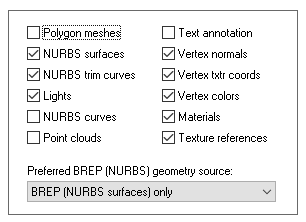
The following checkboxes allow all or only some parts of the OpenNURBS/Rhino .3dm file to be loaded:
Polygon Meshes
If checkmarked, then load in all of the polygon mesh geometry.NURBS Surfaces
If checkmarked, then load in all of the NURBS surface geometry.NURBS Trim Curves
If checkmarked, then load in all of trim curve data that is associated with each NURBS patch.Lights
If checkmarked, then load in the lights.NURBS Curves (Independent)
If checkmarked, then load in all of the independent NURBS curve geometry. These are 2D or 3D NURBS curves which are not associated with any other geometry (such as 2D trim curves of NURBS surfaces).Point clouds
If checkmarked, then load in the 3D point cloud geometry.Text annotations
If checkmarked, then load in the 2D vector text annotations as Okino 3D objects.Vertex Normals
If checkmarked, then load in all of the vertex normals associated with a mesh object.Vertex uv Texture Coordinates
If checkmarked, then load in all of the vertex uv texture coordinates associated with a mesh object.Vertex Colors
If checkmarked, then load in all of the vertex colors associated with a mesh object.Materials
If checkmarked, then load in the materials.Texture References
If checkmarked, then load in the one texture map reference that is referenced by a material.Preferred BREP (NURBS) geometry source:
One of the primary geometry types in Rhino is the "BREP solid", which holds one or NURBS surfaces. Rhino also allows one or more 'render meshes' to be assigned to each BREP object. The render meshes are created when you press the Render button inside of Rhino. It tessellates each BREP object and converts it to one or more polygonal meshes.This combo box determines what will be imported from a Rhino BREP object:
Render meshes, then BREP (NURBS surfaces)
If render meshes exist for a BREP object then they will be imported and used. Otherwise the underlying NURBS surfaces will be imported then tessellated to meshes using Okino software.BREP (NURBS surfaces) only
Only the underlying NURBS surfaces of a BREP object will be imported. Any render meshes will be ignored.Render meshes only
Only render meshes will be imported. If none are found then no object will be imported. Any NURBS surfaces comprising the BREP object will be ignored.NOTE 1: it is preferred that you import the render meshes since they will allow such objects to be textured mapped (NURBS objects do not convey their uv texture coordinates). Also, importing render meshes will prevent any problems with tessellation of the NURBS surfaces in Okino software or any destination program.
NOTE 2: you will have to load the .3dm file into Rhino and Render the scene from multiple viewpoints to get as many render meshes created as possible, before saving out the final .3dm file for Okino software. Rhino only creates render meshes for the 'visible' objects in a scene.
| Secondary Options Panel |
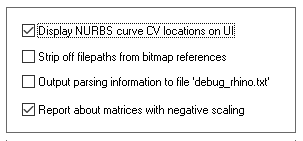
Display NURBS Curve CV Locations on UI
If this checkbox is check-marked then the control point (CV) locations used by any 3D independent NURBS curves will be displayed on the Okino NuGraf/PolyTrans user interface.Strip off Filepaths from Bitmap References
If this option is enabled then the absolute filepath will be stripped off from all the bitmap references, else the filepaths will remain unmodified.Output Parsing Information to File "debug_rhino.txt"
If this checkbox is check-marked then the contents of the .3dm binary file will be verbosely described and output to the file "debug_rhino.txt".Report about matrices with negative scaling
It has been seen that some Rhino files have "negative scaling" in their matrices (in particular, when Rhino instancing is enabled, as matrices are only associated with the instance of Rhino block definitions)."Negative scaling" is a bad form of 3D graphics programming. It basically turns a 3D object "inside out", causing the orientation of the polygonal meshes to be reversed, as well as their vertex normals. Many non-ideal destination 3D programs don't like, or can accept, transformation matrices with negative scaling, as that can cause problems with shading, rendering and with culling front-facing vs. back-facing polygon meshes. This checkbox enables the output of warnings during the Rhino .3dm file import when such conditions are encountered.