

 |
 |
|
|
| |
| You are here: Home » Specialized Sections » CAD: Best File Formats To Use |
|



Support: 905-672-9328 Copyright © 2026 Okino Toronto, Ontario, Canada. |

WARNING: Do not install the demo version over top of a commercial, non-demo version.
A demo-limited version of the stand-alone PolyTrans and NuGraf software packages are available for immediate download. In addition, a secondary download of the "Okino Plug-Ins Super Installer" will allow you to install native Okino import/export converters directly into 3ds Max and Maya. The PolyTrans-for-CINEMA-4D conversion modules are included in the stand-alone Okino software.
Before rushing to download the software please read over and follow the 3-point procedure outlined in the "How to Properly Evaluate Okino Conversion Software" section first. That is the most critical aspect of the entire evaluation process.
Please do not use any of the free converters that come with 3ds Max, Maya, CINEMA-4D or LightWave as part of your end to end conversion pipeline but rather always use Okino's dedicated conversion methods. Also, as the #1 concept to follow to achieve perfect conversions, always source your CAD file data using the short "rule set" as outlined here which is applicable to all of our users.
 Okino Demo Software, Quick Jumps... Okino Demo Software, Quick Jumps... |
- PolyTrans and NuGraf Combined Demo
- Plug-Ins 'Super Installer' for 3ds Max and Maya
- Utilizing & Understanding the 'PolyTrans for CINEMA-4D Conversion System'
- Best Practices for Sourcing and Converting your CAD Files
- Optional CAD Importer Installers (JT Open, CATIA v4 & v5)
- Additional (Optional) Component Libraries to be Downloaded & Installed
- How to Un-Install the Windows-Based Demo Products
- Integration with Popular Multimedia Authoring Tools
- Product Brochures
- Ordering Info, and Add-On Converter Technical Info
| How to Properly Evaluate Okino Conversion Software |
Many of our new customers come to us with well known misconceptions about how they should convert their data files and (in many cases) incorrectly sourced CAD files. Okino is an engineering R&D company for which we work closely and at a grass root's level with our user base, whereby education and awareness is a critical aspect of achieving perfect data translations. Hence, we will always exchange at least 2 or 3 short emails with every potential new user to ensure that they are approaching their conversion process in the correct manner, notably to explain the proper way to source their CAD files and also what conversion method should be used.
The following is the manner in which we interact with all of our new or long-term Okino customers, or anyone evaluating our software for the first time:
Step # 1 - As the most important step to take in our educational process, please send a short email to our CTO Robert Lansdale (lansd_support@okino.com) with the following information:
1a) - The name of the source 3D program and file format from which your data is coming from. Most people will say "IGES or STEP" but that is not entirely correct. It is the name of the source MCAD program which would be most important (SOLIDWORKS, ProE/Creo, etc.) as that ideally defines which source file format should be used. If you are unsure then Robert Lansdale can explain how to discern that information very quickly from your data.
1b) - The destination 3D program and/or file format into which you wish to convert the data.
1c) - Many of our new customers have a "problem" they wish to overcome even if they are not aware of it. If there is some underlying issue which you are having then please state that in your email.
Step # 2 - There are some people who are not aware of how to properly evaluate software for CAD imports. It is not the export process (into your destination program) which is important whatsoever, since our Okino software has complete control over that process. Rather, the most important aspect of the conversion process is the import phase since that is where the sheer complexity of the conversion occurs. Thus, for your initial evaluation purposes, import your source data into our stand-alone PolyTrans or NuGraf program where you will see the 3D model with no imposed demo limitations. You can also press the "Render" button (on the left-most vertical toolbar) to see the 3D model with no demo limitations. Whatever you see in our real time OpenGL 4-up displays, or in the the scanline/ray-traced rendering, is always what you will get when exported to any of the 3D file formats supported by Okino software. The export process, or conversion into 3ds Max, Maya, CINEMA-4D, LightWave, etc. never has to be 'tested' since the export process is under Okino's complete control and as such will always produce a proper file. Even with this stated paragraph, people will still write to us every year or two asking "Why are there holes in the 3D model once loaded into my destination program?" -- if there were no demo limitation holes then there would be no reason to pay for the software since it would then be fully functional.
Step # 3 - Okino software is system-architected and direct-developer supported by Robert Lansdale (our CTO), who works "one on one" with each and every new or existing customer. We do not run a face-less company -- customer communication is front and central to everything we do each day. As such, if you would like a non-demo conversion done by us, or chat with us about the best choice of import/export converters and options to use, then please email us now. You should get a response back within a few minutes, or at most 4-6 hours, during our typical 16-18 hour work day, 7 days a week.
| PolyTrans and NuGraf Combined Demo |
A unified installer is available for downloading either NuGraf or PolyTrans. Press the "Download 64-bit (x64) Now" button to begin installation for Microsoft Windows.
Download the Combined NuGraf+PolyTrans Demo (296MB) If you wish to execute the Okino import/export converters natively within the user interface of 3ds Maya or Maya then you must also download and execute the Okino "Plug-Ins Super Installer" described below. This is a major component of Okino software used by most 3ds Max and Maya users. ! Quick Notes !
1) This unified demo also includes all the components to perform the bi-directional CINEMA-4D conversions as explained in the "How it Works" section of this page.
2) The demo version has the optionally-purchased CAD/Pack, Granite/Pack and DCC/Pack modules enabled by default so that you can easily test them. For the commercial version you need to optionally purchase these add-on modules. Most configurations purchased by our customers will include one or more of the CAD/Pack, Granite/Pack and/or DCC/Pack modules (but almost all sales are for the Dual-CAD-Granite/Pack configuration).
Program requirements:
- Microsoft Windows Eleven/Ten/Eight/Seven 64-bit (x64).
- You will need to have 'Admin' rights during installation (or, better yet, right click on the installer and choose 'Run as Administrator...'). You do not necessarily need 'Admin' rights to run the software.
- There is just one runtime requirement: the Okino "vcplugin64" directory needs to have 'write access' when run in non-Admin mode (but only for a select subset of files, namely the *.xml, *.ini and *.dat files, as this directory acts as the central database to all the licensed CAD SDKs and toolkits). A warning dialog box will appear during program start-up if this is the case and that dialog box will explain how to change the R/W access on this Windows directory.
- Preferably 16GB of memory. 32GB is more than ample for 99% of all CAD conversions.
- For Mac OS X, any good Microsoft Windows emulator. A significant number of our customers have run on the Mac platform for well over 2 decades. 'Parallels' (especially in the 'Coherence mode') or 'VMWare' are both excellent methods of running Okino software natively on the Mac. Please note that PolyTrans-for-Maya requires a PC version of Maya.
Uninstallation Procedure:
- From the Microsoft Windows START menu, choose the "Control Panel" menu option and then the "Programs and Features" applet. Thereafter select the listbox entry named "Okino NuGraf/PolyTrans Demo Installer" and click the "Uninstall" button.
The demo is limited in the following manner:
- Exported 3D files will have every fifth polygon removed. As noted in the explanation above, it is not the export process which needs to be tested or evaluated but rather only a CAD file import process into the main Okino software. Data imported into 3ds Max and Maya, via the native plug-in systems, will have these holes poked in the datasets as well, otherwise the software would be fully functional and there would be no need to pay for the software.
- Okino native .bdf scenes cannot be saved to disk in the stand-alone software,
- A small watermark bitmap will appear in the lower-left corner of all rendered images,
- Texture files used for rendering or re-export will have black lines added to them,
- Only the first 25% of object animation keyframes will be converted,
- No camera animation data will be converted.
| Optional CAD Importer Installers (JT Open, CATIA v4 + v5) |
The combined PolyTrans & NuGraf demo version (see explanation in previous section) contains all the Okino CAD importers except for the following which must be installed separately, after the main demo software has been installed.
Please click on the "Download Now" button and execute the respective 64-bit CAD installer:
1]
JT Open import and export CAD converters (68MB)
Refer to the "JT Open" WEB site for a gallery of JT files to import into Okino software.
| Plug-Ins 'Super Installer' for 3ds Max and Maya |
Currently Supported Plug-In Versions:
- The demo versions are fully compliant with all 64-bit (x64) versions of 3ds Max and Maya.
- 3ds Max 2018 through to 2026.
- Maya 2018 through to 2026.
!! Please Note !! These native plug-in modules require that the demo version of NuGraf or PolyTrans (stand-alone) be installed first (see above).
Download and run the Okino Plug-Ins 'Super Installer' for 3ds Max and Maya To download the demo version of these plug-ins modules click on the "Download Now" button for 64-bit (x64) Microsoft Windows. Execute the downloaded installer to choose from the various versions of 3ds Max and Maya to install the connector plug-ins into.
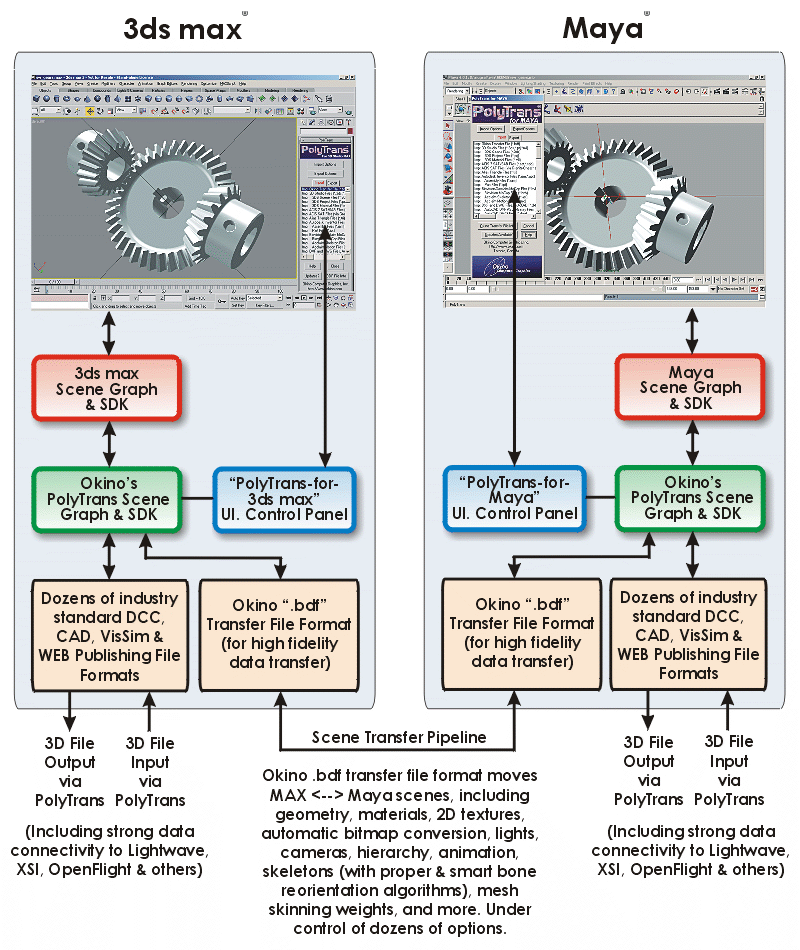
A pivotal aspect of the Okino software for many of our users are the PolyTrans-for-3dsMax and PolyTrans-for-Maya native plug-in systems. These are two of the most professional, longest developed and well supported 3D converter plug-in systems for 3ds Max and Maya. These modules allow 3ds Max and Maya to directly import/export all of the Okino supported file formats from within their respective user interfaces. Other common uses of the plug-in systems is for bidirectional 3ds-max/Maya conversions (via the Okino .bdf file format), import & optimization of large CAD datasets from all major 3D CAD packages & file formats, import/export to all 3D gaming file formats (including skinned mesh and skeleton conversions), OpenFlight VisSim conversions, VR/AR conversions for Unity and Unreal Engine, and of course bidirectional conversions to most other 3D file formats and software packages.
Click for larger image
Quick Usage Info for 3ds Max and Maya PluginsDuring installation of the native 3ds Max and Maya plug-ins you will be presented with options to show the online 'help' file and installation 'info' documents about each of them. At the very least, keep the 'View Info File' check boxes enabled and then review the documents when they appear.
To summarize how to use these plug-in modules:
- [3ds Max]
- Go to the "Utility" panel section of 3ds Max (right side).
- Find and enable the "PolyTrans I/O Converters" entry in the utility panel list of plug-in modules. Drag & drop that new item to a utility panel button.
- Click on the "PolyTrans I/O Converters" button in the utility panel.
- PolyTrans will now run completely embedded within 3ds Max.
- [Maya]
- Enable the 'ptio.mll' plug-in within the Maya plug-in manager (Window/Settings&Preferences/Plug-In Manager).
- Optionally install an icon on the Maya command shelf (pt_icon.bmp).
- Type 'pt' on the Maya MEL command line to start up PolyTrans.
- PolyTrans will now run completely embedded within Maya.
| Additional (Optional) Component Libraries to be Downloaded & Installed |
- [Autodesk Inventor CAD File Import] If you wish to import Autodesk Inventor CAD files, and you do not have a full copy of Autodesk Inventor installed on your computer, then you will need to download and install the 'Inventor Apprentice' runtime COM server system from the Autodesk WEB site. This is now available by downloading and installing the 'Inventor View' application from this permanent Autodesk link. As mentioned on our Autodesk Inventor page, an equally good method to source your files from Inventor is with the DWF-3D file format and the Okino DWF-3D importer.
| Utilizing & Understanding the 'PolyTrans for CINEMA-4D Conversion System' |
PolyTrans-for-CINEMA-4D is one of the most important and well used aspects of Okino software. Okino has been MAXON Computer's sole 3D conversion provider and developer since 1998. We provide error-free and completely robust CAD and DCC conversions into CINEMA-4D, as well as conversion of native CINEMA-4D files into all major down-stream non-CAD 3D programs. The conversions do not require a local copy of CINEMA-4D to be installed; hence, the .c4d conversions can also be done natively with other Okino-enabled programs such as 3ds Max, Maya, LightWave, Adobe Acrobat, NGRAIN and our third party OEM conversion solutions.PolyTrans-for-CINEMA-4D comes installed as part of our standard, stand-alone software. You do not need to install any other components into other programs. In particular, please do not use the Okino/MAXON helper plug-in which came with older versions of the MAXON "Engineering Bundle" package as that is now obsolete.
A quick "How it Works" overview can be read on this page and/or by following the short 4-point process outlined in the 'Best Practices' section below.
More detailed information about using the PolyTrans-for-CINEMA-4D conversion system can be found online here:
| How To - Best Practices for Sourcing and Converting your CAD Files |
From our experience a good number of our new users are not aware of the proper techniques to source their MCAD data and import it properly into their destination program. There is absolutely nothing more important to a proper and mindless CAD conversion other than to source the CAD data in a proper and exacting manner. The following bullet points cover 99% of the common usage scenarios of all Okino software users:
- First, import the CAD file directly into the stand-alone PolyTrans or NuGraf program (including Cinema 4D users). If you are using 3ds Max or Maya then import the CAD data directly using our PolyTrans-for-3dsMax or PolyTrans-for-Maya software.
- The following explains the best possible methods to source your MCAD data:
- For ProE/Creo, import the top-level .asm assembly file only (whose name you would always ask of your vendor who is supplying the data); do not import every single .asm and .prt file which is provided with that collection of files (as some people wrongly do). Alternatively you can import from a top-level Neutral .neu.asm assembly file, or a STEP AP214 file. Please do not accept or import old 1995-era IGES "Surfaced NURBS" files which are exported by ProE/Creo by its default IGES exporter (if you must get an IGES file, always ensure that it was exported as a "BREP Manifold Solids" formatted file -- this is crtitically important!!).
- For SOLIDWORKS, import either the native SOLIDWORKS top-level .sldasm file, a "STEP AP214" file, or alternatively a "BREP Solids IGES" file which has been exported from SOLIDWORKS. You do not need to have a local copy of SOLIDWORKS installed on your computer. For the IGES, ask your SOLIDWORKS data vendor to edit their SOLIDWORKS IGES export settings as follows (1) press the "Reset" button, (2) change the top combo box to "Manifold Solid (type 186)" and (3) disable the "Flatten assembly hierarchy" checkbox.
- For Autodesk Inventor, our personal preference (which is the most 'mentally soothing' and fires the fewest brain neurons) is to have your vendor export out a DWF-3D file from Inventor. Alternatively, if you have Autodesk Inventor or InventorView installed on your computer, import the native top-level .iam assembly file (whose name you would always ask of your vendor who is supplying the data). A STEP AP214 file would be our personal third choice.
- For Solid Edge, import the top-level .asm assembly file or a STEP AP214 file. You do not need to have a local copy of Solid Edge installed on your computer. If using STEP, the "AP214" option must be chosen on the Solid Edge STEP exporter options panel.
- For UG NX, conversions, they are always best done with a STEP AP214 file or alternatively a JT file. The STEP file will give you complete control over the tessellation quality on the Okino side of the conversion pipeline. Okino's JT importer also allows for "on-the-fly" re-tessellation during import, if and when the JT files contains XT or JT BREP solids entities.
- For CATIA v5, you can best use a "BREP Solids IGES" file without having to use our native CATIA v5 importer. Refer to the notes below about asking for a "BREP Manifold Solids" file. Alternatively, you can ask for a STEP AP214 file or import native CATIA v5 files.
- For AutoCAD, Revit and Navisworks, always import from a DWF-3D file (you will want to center the scene at the origin and pre-scale the scene so that it is no larger than 10k units in width, prior to exporting the DWF-3D file from these Autodesk programs). You do not want to accept a DWG file, as everyone would naturally use. DWG is the second worst file format after STL whereas DWF-3D is one of the very best file formats for data translation.
- For MicroStation, import from a native .dgn file or STEP AP214. Refer to the Okino DGN importer's online documentation for a good discussion about how to best deal with the complexities of the DGN file format.
- For Rhino, import from a native .3dm file.
- For other MCAD programs, please refer to the Okino CAD Compatibility page.
- Second, take a look at the imported model's width extents. After import you can move the cursor around the 4 view windows in Okino software to get a sense of the size of the model (by watching the XYZ value change on the status bar), by looking at the extents of the numerical markers on the 3D grid in the upper-right camera viewport, or by using the "Measure Distance" toolbar button to measure the width of the model. You ideally do not want a 3D model to be much less than 1 unit wide or much larger than 1000 to 10000 units wide. If the model is too small then re-import it with a larger scaling factor on the last panel of an Okino CAD importer (such as 10, 100 or 1000). If the model is too large then re-import it with a smaller scaling factor on the last panel of an Okino CAD importer (such as 0.1 or 0.01). Continue this process until you can have the model imported at a sane "size". This will give you ideal z-depth buffering in your desired destination program.
- Third, re-export to whatever file format is appropriate for your destination program.
- Fourth, load the final file into your desired destination program to start your immediate production work. No 'cleanup' is necessary as has been a common belief, and myth, held by many 3D graphics artists over the decades.
Important mini-tutorial about sourcing your files from the IGES file format: as the #1 epidemic of a problem in the conversion world today, it is very common for 3D graphics users to receive their IGES files as the long obsolete 1990's version of 'Surfaced NURBS'. Rather, you absolutely must source your IGES files as the modern "BREP Manifold Solids" variant. It will make a night and day difference in the quality, fidelity and robustness of your IGES file conversions. The full explanation and tutorial about how to best source from IGES and how to determine which of 3 variations of IGES data you have in hand is detailed on this page.
| 3D Import File Converters From Third Party Vendors |
Okino has had one of the most extensively developed plug-in development systems and APIs. Okino's plug-in development program allows third party developers and vendors to create new importers and exporters, as well as system-level plug-ins to create such add-in components as renderers, modelers and search engines.
Click on the following logo to jump to the online list of third party commercial plug-in modules available for Okino software.
| Integration with Popular Multimedia Authoring Tools |
Okino has actively partnered with dozens of 3D software companies to integrate the PolyTrans 3D data conversion software and technology into each of their respective products. Special plug-ins and "connectors" are available commercially from these well known companies:
- MAXON Computer. Please refer to Okino's PolyTrans-for-CINEMA-4D conversion system. This replaces the prior "Engineering Bundle" which most MAXON customers will be familiar with.
- NGRAIN Corp. Their "3KO" exporter is included with each Okino software installation.
- Visual Components. Their connector system allows Okino 3D CAD and DCC file formats to be converted into the Visual Components "3DCreate" software. Please contact Visual Components for licensing information.
- Cadmatic. Their connector system allows Okino 3D CAD and DCC file formats to be natively and directly converted into the Cadmatic and Nupas-Cadmatic software packages. Please contact Cadmatic for licensing information. PDF product brochure available here.
- EON Reality has had select PolyTrans components included in their software packages since 1997.
| How to Un-Install the Windows-Based Demo Products |
To un-install the demo version of NuGraf/PolyTrans, select the "Uninstall" item from the START menu for 'PolyTrans' or 'NuGraf', or do the same from the "Add/Remove" control panel applet.
To un-install the demo version of the Okino Plug-Ins Super Installer, select the "Uninstall" item from the START menu for 'Okino Plug-Ins Super Installer', or do the same from the "Add/Remove" control panel applet.
If you receive a -1612 error during un-installation of an existing Okino product then simply execute the following text on a DOS command line or via the "Run.." menu entry on the START button:
msiexec /uninstall {guid} REINSTALLMODE="" REINSTALL=""
You need to replace {guid} with one of the following strings:
If the command line execution reports an error, you will need to upgrade to Microsoft Windows MSI Installer v3 or newer. Go to http://www.microsoft.com and search for this file to download: WindowsInstaller-KB893803-x86.exe".
- Okino plug-Ins super installer, demo version: {4DE79189-E5DD-49A0-914F-E40919AAB597}
- Combined NuGraf/PolyTrans demo installer: {A21684A9-64C9-4714-AF1D-15D9C8CE5EBF}