

 |
 |
|
|
| |
| You are here: Home » Sales/Ordering |
|



Support: 905-672-9328 Copyright © 2024 Okino Toronto, Ontario, Canada.  |

 Okino Pricing and Ordering Information - Quick Jumps Okino Pricing and Ordering Information - Quick Jumps |

- Basic Pricing Information:
- Base Package pricing
- Add-On Converter Modules pricing synopsis
- CATIA v4+v5 add-on modules pricing
- "JT Open" add-on module pricing
- How to Place an Order
- Online Order Entry Wizard
- Upgrading Older Versions of PolyTrans & NuGraf
- Terms & Conditions of Sale
- Notices
- Granite/Pack detailed overview
- CAD/Pack detailed overview
- DCC/Pack detailed overview
| Online Order Entry Wizard: |
Click here to begin the online order entry wizard.
If you would rather be prompted for products to be purchased, with corresponding prices, please click here for our online ordering system. Follow all the instructions and the last page of the ordering wizard will provide you with a summary of the product costs, taxes (if applicable) and shipping costs.
No charges will be applied to your credit card and no products will be shipped for this query.
| Upgrading older versions of PolyTrans & NuGraf: |
If you wish to upgrade a previous version of PolyTrans or NuGraf to the most recent release then please send email to sales@okino.com with your main serial number, add-on serial numbers and full registration information (name, company, address, and email address) or fill out this online request form. In return we will inform you of the upgrade cost, which is based on when you purchased the product and with what optional add-on modules. We will also take this opportunity to update our registration database with your current contact information.
| Basic Pricing Information: |
To purchase a copy of Okino's PolyTrans or NuGraf you would:1) Purchase a "base" package version
2) Purchase one or more optional add-on converter module packs. Each purchase, for the past several decades, would (statistically) include the CAD/Pack or Granite/Pack modules.
If you are at all uncertain which products and/or modules to purchase then we would highly prefer to validate those concerns prior to purchase, via sales@okino.com. Rarely does any sale proceed without us first exchanging a series of emails with all of our new customers (unless the order is for something common such as for ProE/Creo conversions).
Important: we do not sell a 'one size fits all' shrink wrap package. Rather, we often tailor each sale to the specific requirements of each customer. We prefer to exchange at least one email with each pre-sales customer to ask these important questions:
- From which source 3D program(s) or file format(s) do you wish to import data?
- Into which destination 3D program(s) or file format(s) do you wish to export the data to?
| Base Package Pricing: |
Product Code Base Package Description Price (U.S$) PT-WIN PolyTrans for Windows 64-bits $395 NRS-WIN NuGraf for Windows 64-bits $495 Ontario Residents add 13% HST sales tax. Canadian Residents add 5% GST.
- NuGraf is the main package developed by Okino; PolyTrans is a simplified, derived version of NuGraf for those who just want a minimally user interface for performing data conversion.
- PolyTrans & NuGraf (for Windows) will also run fine on a Mac OSX machine using Parallels or VMWare Fusion. Okino's PolyTrans-for-Maya is a Windows PC product only.
- Additional add-on modules are available separately (see below). Discounts are available when multiple add-on modules are purchased together.
- Every copy of PolyTrans & NuGraf (for Windows) ships with the PolyTrans-for-3dsMax native plug-in module for 3ds Max; these allow 3ds Max to natively import/export all of the stand-alone PolyTrans supported file formats (and also forms one side of Okino's unique 3ds Max + Maya conversion pipeline). This is actually one of our "main products" relative to our user base demands. As a global misunderstood problem, note that no program cannot read/write the .max file format without a resident copy of 3ds Max on your machine. The base package also includes the components which allow for native Cinema 4D import & export file conversions.
- Resellers may sell for less (please contact one of our international resellers for exact pricing).
| Add-On Converter Modules Pricing Synopsis (for Microsoft Windows): |
Okino software is configured for its import and export processes through several key add-on modules. Almost all sales will (statistically) include the CAD/Pack and/or Granite/Pack modules.
Product Code Add-On Module Description Price (U.S$) CAD / Pack The CAD/Pack is primarily targeted towards people who need to import native Autodesk CAD files, native SolidWorks and native Solid Edge files. SolidWorks is our top most popular importer along with native ProE/Creo.
While not known or promoted by Autodesk front-line support, the absolute best way to import data from AutoCAD, Revit, Navisworks and Inventor (with texture maps) is via the Okino DWF-3D conversion system which is one of our most important CAD sub-systems for Autodesk related CAD files.
The CAD/Pack supports: Autodesk Inventor import (.iam and .ipt), DWF import/export (for ideal conversions from AutoCAD, Inventor, Navisworks and Revit), DXF/DWG import/export, Solid Edge import and SolidWorks import.
Please use the Granite/Pack for all IGES-based import conversions (there are 3 major versions of IGES: 1980's 'bounded', 1990's 'surfaced' and 2000's 'BREPs', all of which are handled through our Granite/Pack based IGES importer).$245 DCC / Pack The DCC/Pack has been primarily purchased for those wanting to license our "main product" called PolyTrans-for-Maya, and/or licensed in combination with our key OpenFlight import/export and Softimage (XSI) import/export native support.
$245 Granite / Pack (incl. native ProE + Creo license support) The Granite/Pack is the MCAD BREP-solids 'back bone' of Okino software which allows you to import from literally any MCAD program in a completely robust and efficient manner. It is one of the fastest, most memory efficient and totally robust MCAD conversion systems in the industry. This is also the primary conversion method which supports PTC's ProE/Creo software, as it uses a real and embedded copy of PTC's core software - other comapanies who sell ProE/Creo MCAD importers at a 5 to 10x higher cost are actually using third party, reverse engineered technology from France or India yet do not publicize this fact.
Supported and core MCAD formats supported for import are: ProE & Creo native parts & assemblies, PTC .neutral files, ACIS SAT, IGES (solids, surfaces), Parasolid & STEP. Its day to day primary use is to handle ProE/Creo, IGES and STEP files (STEP AP214 is always preferred over Parasolid for UG NX and Solid Edge).
The Granite/Pack is one of the most stable, universally used technologies for handling native ProE+Creo files, IGES, STEP and Parasolid amongst the Okino user base. For our animators who have never dealt with the CAD world, Granite comes with a standard one year of free updates and maintenance. After that period you can optionally upgrade it again anytime in the future when needed. Statistically, our users upgrade Granite between 1.0 and 2.5 years after the last purchase. The Granite/Pack license you purchase is perpetual and will not expire, but you will need to renew the maintenance in the future to obtain newer versions. You are not locked-in to buying this maintenance every year.
Note: this is the only software available on the market which imports native, encrypted PTC ProE+Creo files using a real, licensed copy of ProE/Creo from PTC and with a very low, subsidized licensing cost.$395 license with standard one year of maintenance and updates from PTC. Ontario Residents add 13% HST sales tax. Canadian Residents add 5% GST.
Multiple Add-On Converter Purchase Discounts
It is most common for Okino customers to purchase the "CAD-Granite"-Pack or Triple-Pack set of modules. The following discounts apply when 2 or more optional add-on converter packs are purchased at the same time, or within 30 days of each other.
Bundle Code Bundle Deal Includes... Price (U.S$) "CAD-DCC"-Pack CAD/Pack + DCC/Pack $395 "DCC-Granite"-Pack DCC/Pack + Granite/Pack $510 "CAD-Granite"-Pack CAD/Pack + Granite/Pack $510 Triple-Pack CAD/Pack + DCC/Pack + Granite/Pack (all optional add-on converter packs) (*) $695 Ontario Residents add 13% HST sales tax. Canadian Residents add 5% GST.
- Unlike most companies who just sell generic IGES and STEP converters to cover their customer's
CAD conversion requirements, Okino tailors each and every sale to the exact source MCAD program from
which the CAD data is coming from. Hence, as is our core policy, please send a quick
email and we'll explain the best and most optimial method to convert
between a specific source and destination set of programs and/or file formats. Ditto for DCC/Animation
programs, especially because we have most of our customers use native file formats and not so much
FBX or Collada (except when exporting to the Unity gaming engine which is best done with FBX). Also
refer to our CAD Compatibility Table for
our generic suggestions on how to import from almost any MCAD program in a reliable manner.
- As something we mention every day, please do not blindly accept any CAD file which is provided to you
by a third party vendor. In 80% or more of these cases, you will have been given the wrong variation of
that file format. Please refer to this section which explains how to
best source your CAD data files. When using IGES or STEP, please ensure that your data vendor is sending you files encoded as "BREP Manifold Solids" and not the default which is most often
the 1990's "Surfaced NURBS" (it has no 'BREP solids topology' information).
- The most stable method to bring in data from Unigraphics NX has always been via STEP AP214 and not Parasolid .x_t format.
- The Triple/Pack is the most cost effective and advanced collection of CAD modules on the market. For those who have never purchased CAD conversion
software before, the average price in the MCAD industry for a single CAD converter is in the $1500 to $2500 range.
More importantly, Okino does not use reverse engineered CAD modules as is done by others, but rather
licenses the industry standard CAD geometry engines from Autodesk (Inventor, DWF), Dassault Systemes (CATIA),
PTC (ProE/Creo), Solid Edge (Siemens), SolidWorks, Spatial (ACIS solids engine), Siemens (JT Open toolkit) and others. The
Triple/Pack includes all related CAD vendor licensing fees, royalties and the first year of maintenance due to these vendors.
- A resident copy of Maya is required to run the native PolyTrans-for-Maya plug-in system. A resident copy of Softimage is required to run the native PolyTrans-for-Softimage plug-in system; however, the dotXSI import and export converters can run in any Okino product without Softimage present.
- The "Granite/Pack" converter suite will allow you to import from all major 3D CAD "solids" (BREP based) file formats,
view the models, optimize the models, and re-export to all Okino supported file formats, including native Cinema-4D files.
These converters can also be accessed directly inside 3ds Max (via PolyTrans-for-3dsMax), Maya (via PolyTrans-for-Maya) and
Softimage (using PolyTrans-for-Softimage). The Okino implementation of the Granite importers work just wonderfully and are
completely robust.
- A resident copy of Autodesk Inventor, Solid Edge or SolidWorks is not necessary to read in these
native files but in most cases it will provide for more flexibility and control. If you do not own a copy
of Solid Edge or SolidWorks, and you wish to have complete control over the tessellation mesh density, then
it is recommended that you use the Granite/Pack module and IGES solids format for SolidWorks
(with the IGES export optons inside SolidWorks set to "Manifold Solid (type 186)" and the "Flatten assembly hierarchy" checkbox disabled), or STEP AP214 for Solid
Edge (make sure to enable the 'AP214' option on the STEP exporter).
- Resellers may sell for less (please contact one of our international resellers for exact pricing).
| 'JT Open' Add-On Modules Pricing (for Microsoft Windows): |
The following CAD import/export modules for Okino software are based on the defacto industry standard JT Open toolkit components from Siemens Corp and hence it doesn't get any better in terms of native JT support.
Product Code Add-On Module Description Price (U.S$) JT Importer This is the defacto industry standard for importing JT geometry files. All versions of JT files are supported up to the current Siemens JT Toolkit release. $495 JT Importer + Exporter This is the defacto industry standard for importing and exporting JT geometry files. All versions of JT files are supported up to the current Siemens JT Toolkit release. $595 Ontario Residents add 13% HST sales tax. Canadian Residents add 5% GST.
- First year maintenance and royalties (due to Siemens Corp for the 'JT Open' toolkit licensing) are included in the prices.
- Please indicate during ordering whether you are a "JT Open" member.
- Resellers may sell for less (please contact one of our international resellers for exact pricing).
| CATIA v4+v5 Add-On Modules Pricing (for Microsoft Windows): |
The following CAD importer modules for Okino software are based on the defacto industry standard CATIA v4+v5 components from Spatial Corp and its parent company Dassault Systèmes (the makers of CATIA). For those people who have never purchased high-end CAD software before, you need to be made aware that this specialized Spatial-based software is sold via an upfront license fee and a per-year reoccurring maintenance fee, as stipulated by Spatial Corp.
Note: these are very specialized and niche converter modules. For non-enterprise users, we have always recommended using IGES solids (via our Granite/Pack license) to import from CATIA v4+v5.
Product Code Add-On Module Description Price (U.S$) Spatial
CATIA v4Imports and processes BREP solids-based CAD geometry files stored in the CATIA v4 native file formats. File extensions supported = .model, .dlv, .exp and .session. First year = $1095 + $495 pre-paid & discounted Spatial maintenance. Subsequent years = maintenance renewal of US$795.
Spatial
CATIA v5Imports and processes BREP solids-based geometry files stored in the CATIA v5 native parts and assembly file formats. File extensions supported = .CATPart and .CATProduct. First year = $1495 + $495 pre-paid & discounted Spatial maintenance. Subsequent years = maintenance renewal of US$795.
Ontario Residents add 13% HST sales tax. Canadian Residents add 5% GST.
- ** IMPORTANT ** Spatial Corp. licenses its CATIA licenses on a per-year basis (this is not an Okino policy). The licenses are not perpetual, as are often the case with high-end CAD modelling software like CATIA. Each year the license has to be renewed via the yearly 'maintenance fee' noted in the above table. Okino personally contacts its users of the Spatial converters at month 11 and just before month 12 to remind them of the pending maintenance renewals. If the maintenance is not renewed then the CATIA and/or ACIS licenses will expire. Spatial Corp. requires that the maintenance fee be paid yearly, starting with the initial purchase. If you let the maintenance payment lapse (and let the license expire as a result), then decide to start paying them again at some undetermined time in the future to re-start the license, a "re-instatement fee" will then be due to Spatial Corp.
- Resellers may sell for less (please contact one of our international resellers for exact pricing).
| How to Place an Order: |
- By Online Pre-Ordering Wizard:
- Go to our Online Order Entry wizard, follow the instructions,
optionally include your credit card information, and press the Submit! button. Your credit card will
not be processed immediately, so you can also use this wizard to determine the full price and product
configuration of an Okino software purchase. The first page of the ordering system also discloses
all common terms of Okino software ordering and shipping. If you do not include credit card information
then we will email you a pro-forma invoice with the final tally of costs, onto which you will write in
your credit card information and send back to us via email or fax.
- From one of our International Resellers
- Go to our Online Order Entry wizard, follow the instructions,
optionally include your credit card information, and press the Submit! button. Your credit card will
not be processed immediately, so you can also use this wizard to determine the full price and product
configuration of an Okino software purchase. The first page of the ordering system also discloses
all common terms of Okino software ordering and shipping. If you do not include credit card information
then we will email you a pro-forma invoice with the final tally of costs, onto which you will write in
your credit card information and send back to us via email or fax.
- By E-mail:
- If you do not wish to use the online order entry system then please feel free to email your order request to sales@okino.com. Please
provide your name, company information, address, phone number and proper email address. You do not
necessarily have to provide your credit card information in the initial email. The processing will be
similar to that described in the By Online Pre-Ordering Wizard section above.
- If you do not wish to use the online order entry system then please feel free to email your order request to sales@okino.com. Please
provide your name, company information, address, phone number and proper email address. You do not
necessarily have to provide your credit card information in the initial email. The processing will be
similar to that described in the By Online Pre-Ordering Wizard section above.
- By Fax:
- Go to our Online Order Entry wizard, follow the instructions,
include your credit card information, print out the last page (summary information) using the
"Print" button on your WEB browser and fax to 1-905-672-2706.
- Go to our Online Order Entry wizard, follow the instructions,
include your credit card information, print out the last page (summary information) using the
"Print" button on your WEB browser and fax to 1-905-672-2706.
| Terms & Conditions of Sale: |
All sales of Okino Computer Graphics, Inc. (Okino) products are covered by these Terms and Conditions of Sale and override any purchaser terms in any form. Okino sells only on its own standard terms and conditions unless specifically agreed otherwise in writing by a duly authorized officer of Okino.
- All prices quoted in U.S. dollars and F.O.B. Okino's shipping location (or a Okino authorized fulfillment house acting as Okino's agent). Prices, discounts, and terms are subject to change. Standard payment terms are payment in full with order. All payments must be made in either U.S. or Canadian dollars.
- Payment methods:
- VISA, Mastercard and American Express credit cards.
- Wire transfer payment, which is common and preferred by our European customers.
- Sales and excise taxes, duties, importation fees and other such charges are the sole responsibility of the purchaser to pay. All quoted prices are before any such charges are applied. G.S.T and Ontario H.S.T (if applicable) sales taxes will be added to all Canadian orders.
- There are no shipping & handling charges for electronic downloads of the software. No physical shipments are made.
- The title and right of possession of any shipped Okino products shall remain with Okino until payment in full has been received by Okino.
- Title to all software products shall remain with Okino and only a license to use software is sold.
- The purchaser agrees to fully comply with the Okino Computer Graphics Software License Agreement when purchasing Okino products.
- Installation of Okino products is the sole responsibility of the purchaser. In no event will Okino be responsible for any additional hardware or software on purchaser's computer to use Okino products.
- Okino warrants that it has the right to license its software products. Okino also warrants that it's products will be free from defects in material and workmanship for a period of 90 days after shipment and that they meet the operational and technical specifications set forth in the accompanying user documentation.
- Okino software has always come with a standard and liberal one year of free product maintenance and updates (except for specific sub-products as explained elsewhere on this page or elsewhere, such as the Spatial CATIA v4 & v5 modules). The statistical average for upgrades, made by our most ardents of software users, is 2.5 years, if and when such upgrades are actually needed (such as for new releases of ProE/Creo, SolidWorks, 3ds Max or Maya); other users can go 4-6 years or even a decade without an upgrade. Older program installers are archived for approximately 5 years so that you can re-request your product download again based on the date of last purchase or upgrade. Tech support is always from our senior developers - it has always been quick, expert-level accurate and free regardless of the period of ownership of the product.
| Granite/Pack Overview: |
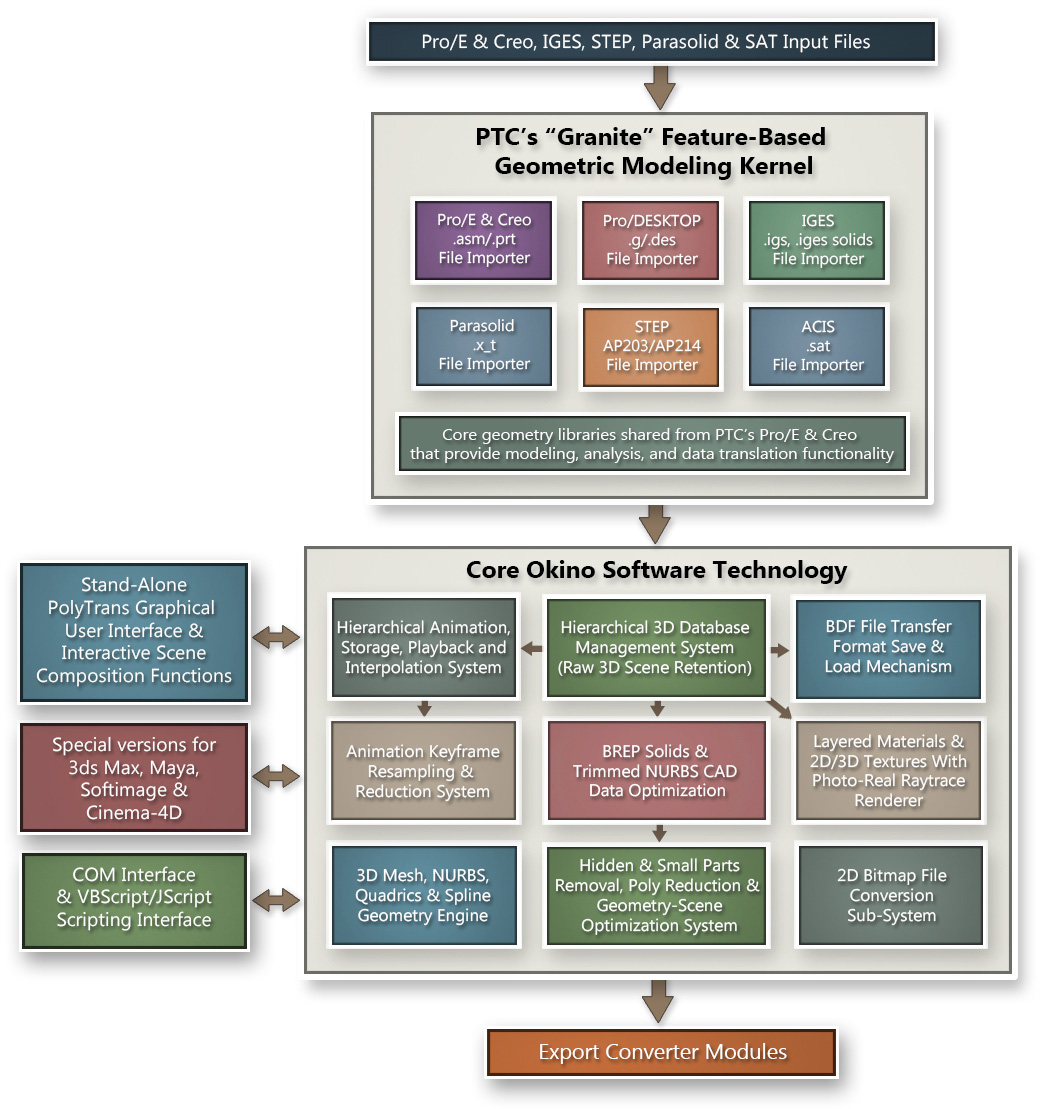
Okino's Granite/Pack is the core back-bone of Okino's BREP solids-based CAD conversion pipelines. Click here for an overview of the CAD file formats supported, a feature list and the screen snapshots of the importer wizard panels. A succinct selection of imagery created by users of the Okino Granite/Pack can be viewed online here.
This suite of CAD importers is one of Okino's all time most popular solutions for our CAD customers, in particular for its use in handling native and encrypted ProE/Creo files (there is technically no better solution to import ProE/Creo data), and for all variations of IGES+STEP+Parasolid BREP solids files. It is our 'work horse' CAD importer pipeline and the backbone for many of our customers' CAD conversion requirements. Note that you would use the alternative Okino CAD/Pack-based converters for Autodesk based CAD file formats (Inventor, AutoCAD, Navisworks, Revit), DWF/DWG, Solid Edge and SolidWorks. It is in the best interest of Okino customers to own this module for most of their CAD conversions, except for the specialized cases covered by our CAD/Pack. The Dual-CAD-Granite/Pack license will handle almost any combination of source CAD data that you may be provided by clients and as such is the logical choice of software to purchase.
For ProE/Creo data users, this module inserts a real, live running copy of core ProE/Creo software inside of Okino software, allowing for the perfect import and translation of encrypted ProE/Creo files, up to the most recent version. No intermediate or reverse engineered file formats are used to convert the ProE/Creo data, as is used in all other non-Granite related ProE/Creo conversion pipelines. Okino is by far one of the most active and ardent users of the PTC Granite BREP-solids kernel and as such provides very strong CAD conversion through this pipeline. Okino has been the primary provider of ProE/Creo conversions software since the mid 1990's, using the real ProE software from PTC - we do not use reverse engineered toolkits, or secondary file formats, to import ProE data so the data conversion process is always ensured to be error free.
Click on image to see full scale rendition
| CAD/Pack Overview: |
The Okino CAD/Pack is one of the two core, staple add-on modules used to convey CAD data into Okino's stand-alone PolyTrans & NuGraf packages, as well as PolyTrans-for-3dsMax, PolyTrans-for-Maya, PolyTrans-for-Softimage, Cinema-4D, Lightwave, NGRAIN, other OEM licensed products and dozens of Okino 3D export file formats.
Converter specific information can be found in these Okino WEB pages: Autodesk Inventor, DXF/DWG (with ACIS solids in DWG files), DWF-3D (the preferred file format to import data from Autodesk CAD products such as AutoCAD, Navisworks and Revit), Solid Edge and SolidWorks. Note: all IGES conversions should be done via the Okino Granite/Pack module and 'BREP solids-based IGES files'.
Okino has been actively involved with developing our own CAD converters starting in 1988, which equally applies to our CAD/Pack module. We don't "write" converters but rather "nurture" them over years and years to handle all varieties of data that our customers often send our way.
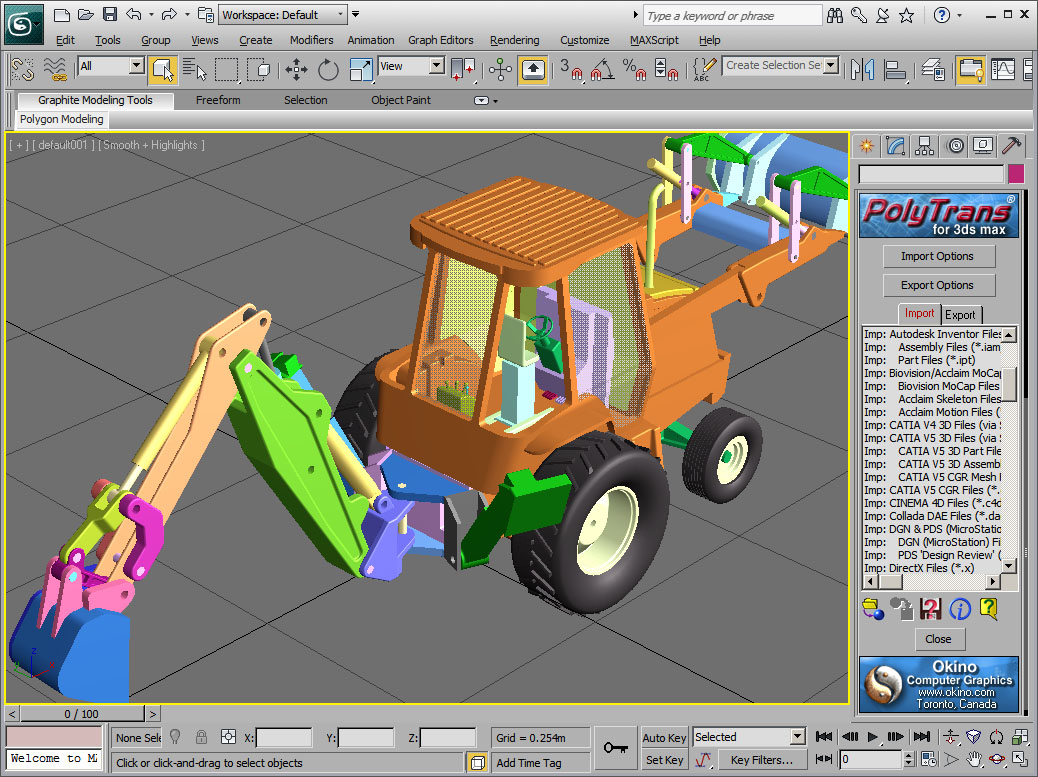
SolidWorks 'Backhoe' model imported into 3ds Max via PolyTrans-for-3dsMax.
Click on image to see full scale rendition.
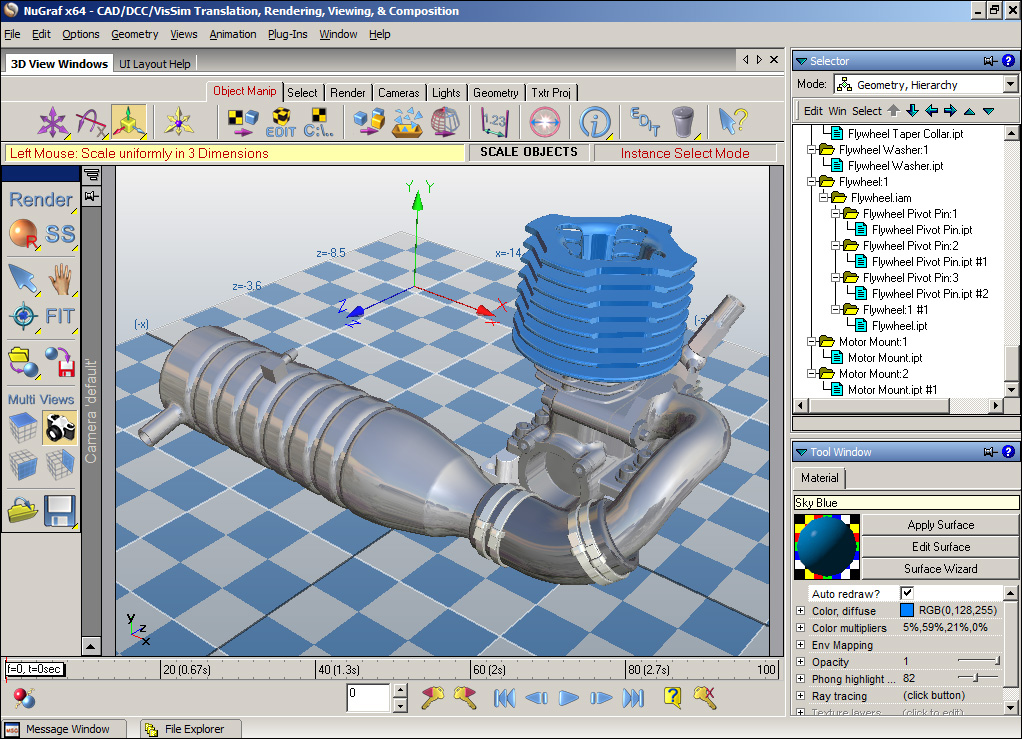
Autodesk Inventor engine model imported directly into Okino's NuGraf.
Click on image to see full scale rendition.Click on the "Imp" or "Exp" underlined links to review the online documentation for the respective converter modules.
Converter File Format Extensions Version Import? Export? Autodesk Inventor .iam (assemblies), .ipt (parts) All versions Import Autodesk DWG .dwg or .dxf 2014 Import DWF-3D (best method to source from AutoCAD, Inventor, Navisworks and Revit) .dwf All versions Imp & Exp Solid Edge .asm (assemblies), .prt (parts) All versions Import SolidWorks .sldasm (assemblies), .sldprt (parts) All versions Import
NOTES:
- DXF, DWG and DWF are imported from disk-based files whereas Inventor, Solid Edge and SolidWorks either import from disk-based files or they can use "Automation" to query highly accurate data from a running copy of Inventor, Solid Edge or SolidWorks.
| DCC/Pack Overview: |
The DCC/Pack contains our heavily developed converters dealing with the common "Digital Content Creation" animation and modeling programs, as well as VizSim (OpenFlight).
To many people these may seem to be just generic import and export converter modules, but "under the hood" these modules are the life blood of many an Okino programmer. For example, converting between 3ds Max and Maya (via the native PolyTrans-for-3dsMax and PolyTrans-for-Maya plug-in systems) is a multi-decade "occupation" at Okino; we continue to clone the common functionality of 3ds Max and Maya into the core Okino toolkit software (and related interfaces) so that raw, mostly unmodified data can flow between these two programs using PolyTrans as the common stepping stone.


FBX 'Samurai' model (courtesy of Autodesk) imported, animated & rendered in Okino's NuGraf.
Click on any image to view a Windows Media 640x480 animation (2.3MB download).These converters are grouped together in the DCC/Pack as they are developed in unison so that data can flow fairly evenly between any two DCC-based animation or VizSim packages. Okino's known forte has been in providing hands-on, developer-based support to our customers to ensure that these converters work well in production pipelines (and some customers use our converters in the most unique ways!). Note that the PolyTrans-for-3dsMax converters can be scripted using MaxScript, the PolyTrans-for-Maya converters using MEL, and the other Okino converters using Okino's VBscript or JScript based scripting language.
Converter File Format Extensions Version Import? Export? PolyTrans for Maya Runs inside Maya Maya 2013 to current Imp. Exp. OpenFlight .flt 14.2 to 16.x Imp. Exp. Softimage (XSI) .xsi dotXSI 3.0-3.6-and-newer import + export Imp. Exp.
NOTES:
- PolyTrans-for-Maya runs inside Maya as a native plug-in system (and requires a resident copy of Maya). This allows a Maya user to easily access all of the stand-alone Okino converter modules. To convert data to/from 3ds Max use the Okino ".bdf" scene transfer file format and the native PolyTrans-for-3dsMax plug-in system on the 3ds Max side. To convert data to/from Softimage use the .dotXSI file format from the Maya side. To convert data to/from Lightwave use the Lightwave import/export converters from the Maya side.
- Okino's OpenFlight exporter is unique in the fact that it can read from newer OpenFlight file formats and write to the much older 14.2 file format; the 14.2 file format is still quite common in the military VizSim markets. Okino writes its own FLT exporter module and has complete control over its development and refinement. The FLT importer utilizes the Presagis OpenFlight DLLs to do all the parsing while custom Okino code walks the database tree and converts the "node based" VizSim information to scene graph data more acceptable to the common animation programs.
- Both Collada import/export and our completely unique "trilogy" of v5 (Kaydara), v6 (Alias) and v7 (Autodesk) FBX import/export converters are contained in the v5 base level software.


| Notices |
PTC, The Product Development Company, Granite, Pro/ENGINEER, Creo Elements/Pro, Pro/DESKTOP, and all PTC product names and logos are trademarks or registered trademarks of Parametric Technology Corporation or it subsidiaries in the United States and in other Countries. ACIS and SAT are registered trademarks of Spatial Corp. Parasolid is a registered trademark of Siemens Corp. All other brand names, product names, or trademarks belong to their respective holders.