

 |
 |
|
|
| |
| You are here: Home » Developer Info |
|



Support: 905-672-9328 Copyright © 2024 Okino Toronto, Ontario, Canada.  |

Welcome to Okino's Plug-Ins SDK home page!
This section is dedicated to third party software developers who wish to write plug-in modules for Okino's NuGraf and PolyTrans software packages (import/export modules will also be usable within the special native versions of PolyTrans such as PolyTrans-for-3dsMax and PolyTrans-for-Maya).
Quick jumps:
- Overview of the Various Plug-In Types and APIs
- The "Big" Picture
- The NuGraf Developer's 3D Toolkit SDK
- Import Converter Plug-Ins
- Export Converter Plug-Ins
- User Interface API
- The Okino Import/Export Cover Function "Helper" Library
- Third party plug-In modules built using the Okino Plug-Ins SDK
The following information will provide a cursory overview of the Okino Plug-Ins SDK, what kind of plug-ins can be created and what APIs are exposed to third party developers. To view what other developers have written using this SDK, and have wished to openly publish, please click here to visit the Okino Third Party Plug-In Modules WEB page.
If you are interested in writing a plug-in module then please send an email to support@okino.com. There is no charge to using the SDK. However we do require that every developer read and sign off on our normal SDK usage agreement.
The SDK comes with reams of API documentation and a number of well thought out examples. The stock 3D exporter, in particular, is a complete exporter solution which you only need to tear down (and not build up by yourself) then merge with your own file format information - we have used too many third party SDKs ourselves to know how daunting the task of writing a converter can be without a good foundation of example code and related documentation.
 Overview of the Various Plug-In Types and APIs Overview of the Various Plug-In Types and APIs |
Okino's plug-in SDK has evolved over a long period of time to the point today where the shipping versions of the PolyTrans and NuGraf software allow for 3 major types of plug-in modules:
Each are described in their own sections below.
All compiled modules are stored in the "vcplugin64" directory of the stand-alone PolyTrans/NuGraf software and are associated with 3 file extensions:
- The core executable is contained in the .dll file.
- The "run time information" is contained in the .rti file.
- And the optional help file is contained in the .chm or .hlp file.
When the software starts up it sorts the plug-ins according to the prefix on each of them and also the contents of the .rti files. Import converters begin with the letters "imp_", export converters begin with the letters "exp_" and the system-level plug-ins begin with the letters "ui_". Each converter is considered "unique" based on the GUID number contained in the .rti file, as well as some GUIDs used within the system-level plug-ins.
The 3D model import and export converters will show up inside the user interface in the File/Import and File/Export menus (for NuGraf) or Translate!/Import and Translate!/Export for PolyTrans. The system-level plug-ins optionally can have custom menu items added to any major main menu (the "Plug-Ins" menu is default) as their main method of execution by the user, and they can add custom docking or MDI-document windows to the user interface, or custom panels to the "Selector Window". Import/export converter plug-ins can also run inside PolyTrans-for-3dsMax and PolyTrans-for-Maya, etc. However, the system-level plug-ins can only run within the NuGraf or PolyTrans stand-alone Windows software.
| The "Big" Picture |
The following block diagram shows the basic interrelationship of the various components and APIs which make up the major Okino software (external modules such as PolyTrans-for-3dsMax and PolyTrans-for-Maya are not shown).
Click image to view full sized version

The two most important components are:
- The NuGraf Developer's 3D Toolkit. This forms the heart and core of all Okino software. In general terms, the toolkit is used for all 3d scene graph management functions, Okino .bdf file I/O management, bitmap import/export/conversion, and as a framework of 3D functionality for the higher-level Microsoft Windows user interface.
- The stand-alone PolyTrans/NuGraf software. This can be considered the Microsoft Windows user interface layer to the NuGraf 3D Toolkit core software. For the simplistic explanation provided in this section, the user interface component hosts the mechanisms to load/execute/control the system-level, import and export plug-in modules. The NuGraf 3D Toolkit plays no role in the management of the plug-in modules since plug-ins are Microsoft Windows dependent and the toolkit is purely operating system independent.
As further explanations of the above block diagram:
- The "Okino User Interface API" (Ok-UI-API) is an exposed C++ class from the main stand-alone PolyTrans/NuGraf software. It allows system-level plug-ins to make callbacks into the main Microsoft Windows user interface for such tasks as adding menu items, finding program state and so forth. A pointer to this class is provided to the system-level plug-in module to allow it to access these functions. Import/export plug-ins do not have access to these functions.
- The "Import/Export Cover Function Helper Library" is a generic set of routines which can be utilized by any plug-in module or the stand-alone NuGraf/PolyTrans software itself. This library provides routines that help bridge the higher level user interface levels of Okino software with the lower level NuGraf 3D Toolkit functions. For example, some routines provide cover functions which makes it much easier to import 3D geometry data to the 3D Toolkit from import plug-ins and system-level plugins. Other routines provide common Microsoft Windows functions to the plug-in modules (such as allowing users to interactively choose a file directory, or to modify dialog box controls), and yet other routines provide a simple framework for import/export plug-ins to show status/feedback/cancel dialog boxes inside the main PolyTrans/NuGraf stand-alone software.
- The "System Plug-In Modules" are loaded by the main stand-alone PolyTrans/NuGraf software at start-up and are executed by an end-user through custom menu items added to the main user interface (or via custom Selector Window panels, or plug-in created docking/MDI-document windows), then unloaded when the stand-alone software terminates. Most of the interaction from the system-level plug-in module is between it and the NuGraf 3D Toolkit. The plug-in module has full access to the toolkit, so it can be used for such tasks as creating third-party rendering systems, generic modeling programs, import converters, export converters and much more; import/export plug-ins are similar to system-level plug-ins except that they do not remain in memory between executions and they do not have access to the I/O Cover Function Helper Library. The plug-in may also utilize the functions from the "I/O Cover Function Helper Library" as well as make callbacks via the "Okino User Interface API".
- The "3D Model Import converters" are loaded by the main stand-alone PolyTrans/NuGraf software when an end-user selects one from the File/Import or Translate!/Import menus, and automatically unloaded after the import process has completed. The prime job of an import converter is to parse a 3D file and send the 3D scene data to the NuGraf 3D Toolkit via its API. The plug-in may also utilize the functions from the "I/O Cover Function Helper Library"; typically an import converter will use the cover function library to help with the import of mesh and NURBS data, and also use its generic framework to handle the clean-up of an import process should it abort early (one of the more important aspects of the cover function library to an import converter is to create unique handle names for the core toolkit and to keep a list of all data items imported so that they can be deleted if an abort process occurs). An import converter sends status information back to the PolyTrans/NuGraf user interface (as well as receive abort/cancel indication) via a callback mechanism handled by the I/O Cover Function Helper Library.
- The "3D Model Export converters" are loaded by the main stand-alone PolyTrans/NuGraf software when an end-user selects one from the File/Export or Translate!/Export menus, and automatically unloaded after the import process has completed. The prime job of an export converter is to query the 3D scene data from the NuGraf 3D Toolkit via its API and export the data to a 3D file. The NuGraf 3D Toolkit has a very well developed export conversion pipeline and "engine", wherein a plug-in export module can set upwards of a dozen or more flags to define what kind of data it can accept and thus not have to worry too much about what type or kind of data it will be expected to handle during the export process. The plug-in may also utilize the functions from the "I/O Cover Function Helper Library"; typically an export converter will use the cover function library to help with the query of mesh and NURBS data. An export converter sends status information back to the PolyTrans/NuGraf user interface (as well as receive abort/cancel indication) via a callback mechanism handled by the I/O Cover Function Helper Library.
| The NuGraf Developer's 3D Toolkit SDK |
The "NuGraf Developer's 3D Toolkit C API" is the all-compassing toolkit and API which forms the core of all Okino software and all technology developed by Okino since January 1988. The toolkit is documented in a separate, fully cross referenced, online help file. You will certainly make use of the toolkit manual at some point while developing an Okino plug-in module. While not used extensively by export converters (since they use cover functions mostly), the NuGraf C API will be utilized mainly for import and system-level plug-in modules.
The toolkit has most of the functionality of a full featured rendering/modeling/animation system, including geometry database support, animation, full rendering, material + texture attributes, color management, bitmap conversion, color space conversion, and much more. The 3D import/export converters and system-level plug-ins themselves are layered on top of the 3D toolkit. The toolkit has expanded over time to include more and more "conversion engines" which allow raw data from most 3D file formats and packages to be imported, stored, rendered, displayed and re-exported with little degradation. Recent additions have seen a spline cross-conversion engine, animation conversion engines, trimmed NURBS support, 13 levels of texture modulation for shaders and more.
The NuGraf Toolkit is used by plug-in developers when they want to gain access to the main 3D scene graph (geometry, instances, lights, camera, materials, textures, animation, etc.), or to a multitude of support routines to aid in 3D software programming (bitmap import/export, bitmap color quantization, math libraries, hierarchy enumeration, geometry processing routines, and much more).
The toolkit has an unusual but powerful and forgiving API based on the 'C' variable-length parameter passing protocol. This is fully described in detail in the "The NuGraf 'C' Interface" section of its respective manual. For example, the following code creates a point light source with an intensity of 0.8 and a shine-from direction of (10, 20, 10):
example_code() { Nd_Float Nv_Light_Intensity = 0.8; Nd_Vector Nv_Light_Shinefrom = { 10.0, 20.0, 10.0 }; Ni_Light("light1", Nt_MODEL, Nt_POINT, Nt_CMDSEP, Nt_INTENSITY, &Nv_Light_Intensity, Nt_CMDSEP, Nt_SHINEFROM, Nv_Light_Shinefrom, Nt_CMDSEP, Nt_CMDEND); }and likewise there is a corresponding inquiry API:
example_inquiry_code() { Nd_Token Nv_Light_Model; Nd_Float Nv_Light_Intensity; Nd_Vector Nv_Light_Shinefrom ; Ni_Inquire_Light("light1", Nt_MODEL, (Nd_Token *) &Nv_Light_Model, Nt_CMDSEP, Nt_INTENSITY, &Nv_Light_Intensity, Nt_CMDSEP, Nt_SHINEFROM, Nv_Light_Shinefrom, Nt_CMDSEP, Nt_CMDEND); }All parameters are passed by reference and not by value. To read the above code all you really need to know is that all parameters passed across the API interface are pointers with the special cases of Nt_CMDSEP being a "command separator" and Nt_CMDEND being a "command end" token.
| Import Converter Plug-Ins |
The following diagram shows a very high level structure of how import converter modules relate to the core 3D database, the NuGraf C API (as defined by the "NuGraf Developer's 3D Toolkit"), and the "Import/Export Cover Function Helper Library". As 3D model import converter modules communicate with the core 3D database using the "NuGraf 'C' API", they can potentially import all entity types which are supported by the toolkit API (everything from mesh/NURBS/quadrics, to materials/textures/bitmaps, animation and more).
Click image to view full sized version
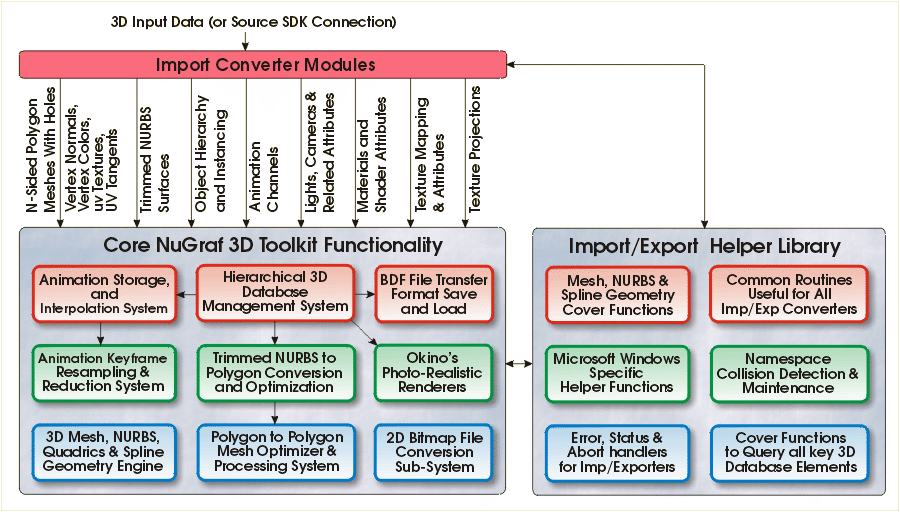
An import converter is invoked from the Import sub-menu of the main PolyTrans or NuGraf host programs. At the point of execution the importer can open up a disk file, parse it and feed the data into the internal 3d database using NuGraf C API function calls, or calls made to the toolkit indirectly through the Import/Export Cover Function Helper Library. The importer is not limited to populating the database from external files, but rather it can populate the 3d database using pre-defined NuGraf 'C' API script programs as well. Basically the import converter can be considered a general purpose plug-in program which creates and defines 3d content for the core 3d database (for example, an OLE drop target could be defined as an import converter, since it would source 3d data).
The execution of the import converter module, and the handling of its status, feedback and warning/error messages is handled completely by the highest level user-interface code in the NuGraf/PolyTrans stand-alone programs, and/or by the Import/Export Cover Function Helper Library.
| Export Converter Plug-Ins |
The following diagram shows a very high level structure of how export converter modules relate to the core 3D database, the NuGraf C API (as defined by the "NuGraf Developer's 3D Toolkit"), and the "Import/Export Cover Function Helper Library". As export converter modules communicate with the core 3D database using the "NuGraf 'C' API", they can potentially export all entity types which are supported by the toolkit API (everything from mesh/NURBS/quadrics, to materials/textures/bitmaps, animation and more).
Click image to view full sized version

An export converter is invoked after the core 3D database has first been composed with a 3D scene, most often from an import conversion process. The export converter then uses a well defined sequence of events to query all the necessary data from the database, using NuGraf C API function calls, or calls made to the toolkit indirectly through the Import/Export Cover Function Helper Library. The execution of the export converter module, and the handling of its status, feedback and warning/error messages is handled completely by the highest level user-interface code in the NuGraf/PolyTrans stand-alone programs, and/or by the Import/Export Cover Function Helper Library.
| System-Level Plug-Ins |
System-level plug-in modules are very similar to 3D model import and 3D model export plug-in modules, but more powerful and generic. Import/export converter plug-ins have no persistence between each execution (they are deleted from memory after execution) whereas the system-level plug-ins are loaded just before the main message loop begins and are flushed from memory only when the main application is exiting. In addition, the system-level plug-ins have the added benefit of creating custom recursive menu structures (menus with child menus) to the main "Plug-Ins" menu and they are blessed with the ability to access the Okino UI API which the import/export plug-in modules cannot.
System-level plug-ins can be used for many purposes, some of which include:
- Custom plug-in renderers. When the menu item is selected the plug-in would query the entire Okino core database (via the extensive NuGraf Developer's 3D Toolkit API) and then render an image.
- Custom plug-in geometry creation tools. The plug-in could be used, for example, to create a 3D font application or a program to model any type of 3D data. Once the data has been modeled it can be dumped into the core Okino database via the NuGraf Developer's 3D Toolkit API.
- Custom 3D model import and export converters. Normally a plug-in 3D model import/export converter has a slightly different calling convention such that it will appear in the File/Import or File/Export menus. However, there is no reason why it can't be called from a system-level plug-in module. The main differences is that an import or export plug-in is only loaded when the user selects the converter in the File/Import or File/Export menu (and unloaded directly afterwards) whereas a system-level plug-in module remains fully loaded during the entire duration of the main PolyTrans/NuGraf software's execution time.
- Custom 2D bitmap image or video-frame "file import server" to the core Okino toolkit. This is a well developed API and method whereby system-level plug-in modules can add new image or single-frame-video file format support to the overall program capabilities.
- Generic tools such as bitmap editors (such as was done for the Okino "Multimedia 3D Viewer and Editor") or file viewers.
- Or, in general, any tool which can utilize the wide array of functionality provided by Okino's NuGraf Developer's 3D Toolkit API. The user interface of PolyTrans & NuGraf sits on top of this toolkit for all geometry, database, color management, hierarchy and .bdf file control. This same level of functionality is available to any system-level plug-in developer.
A system-level plug-in module can also access a wide range of user interface elements (explained in the next section below), exposed by the main Okino software, such as:
- Adding custom menu items throughout the user interface,
- Adding and controlling the docking window mechanism,
- Adding custom .NET-style docking toolbars,
- Adding managed filename display,
- Adding custom panels with custom "roll up" dialog boxes to the "Selector Window",
- And more!
| User Interface API |
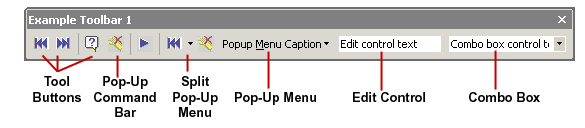
The "Okino User Interface API" (Ok-UI-API) is an exposed class from the main PolyTrans/NuGraf stand-alone software that can be accessed by any system-level plug-in module. The member functions allow access to various aspects of the Microsoft Windows user interface of the stand-alone PolyTrans/NuGraf software packages, such as:
- Determining UI state, redrawing windows, changing program state,
- Adding custom menu items throughout the user interface,
- Adding and controlling the docking window mechanism,
- Adding custom .NET-style docking toolbars,
- Adding managed filename display,
- Adding custom panels with custom "roll up" dialog boxes to the "Selector Window",
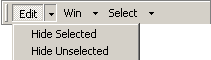
- Emulating a Win32 hMenu windows menu using a toolbar, which is needed when plug-ins need to place a menu on a child window (or any window which uses the docking/document window forms),
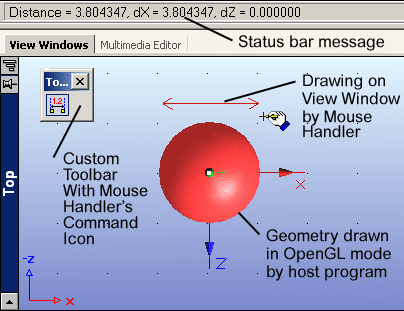
- Hooking into the mouse event handler mechanism so that plug-ins can provide mouse services and interactive commands to the main user interface,
- And more!
| The Okino Import/Export Cover Function "Helper" Library |
The Import/Export Helper Library is a library of common routines which are often used in many Okino import/export/system-level plug-in modules, as well as in its main stand-alone software. The library is contained in the Okino vc4_imp.dll or vc64_imp.dll file.
This library includes such functionality as routines to simplify import of meshes/NURBS/splines to the core NuGraf Toolkit (ie: 'cover functions'), extensive cover functions to query all major entity types from the core NuGraf Toolkit and store the parameters in easily accessible local data structures (for export converter development), Microsoft Windows cover functions (for modifying dialog boxes, finding directory paths, etc.), communication routines to allow plug-in modules to exchange status data with the main PolyTrans/NuGraf user interface (the status dialog boxes), proxy routines to handle status update displays for import and export converter modules, routines to circumvent namespace collisions, and much more.